May 20, 2020 | Blog
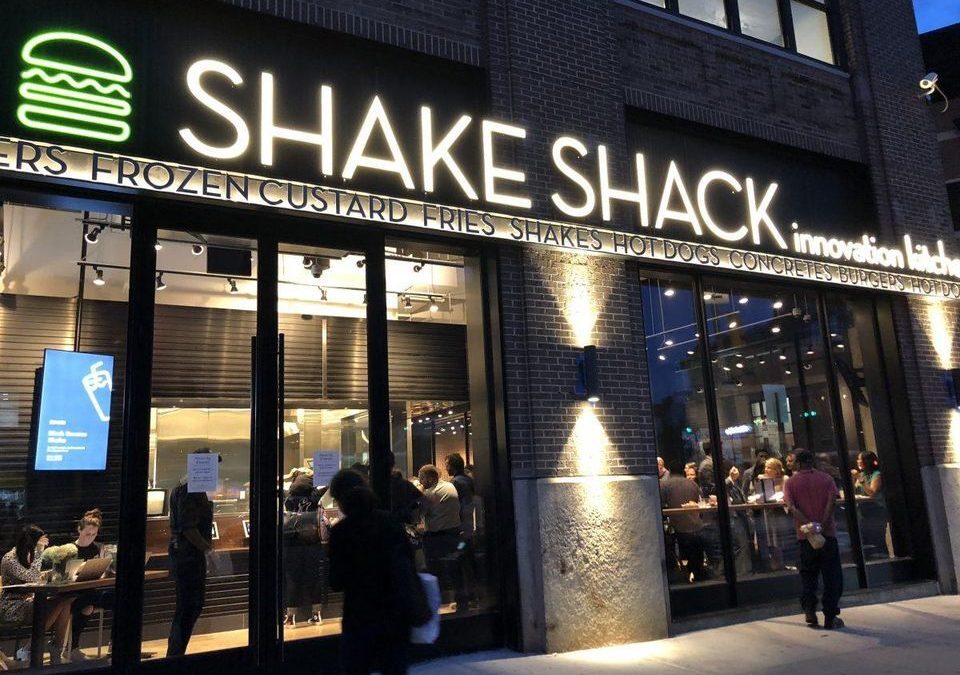
Once upon a time, Shake Shack was one of the many one-off boutique stands that set shop in New york’s Madison Square Park. Today, having recently gone public in an IPO that ballooned to a whopping $1.6 billion, the once-humble shack has grown to become a multinational burger titan with franchises in Moscow, Istanbul and Dubai.
So, what is it that makes Shake Shake so successful? More importantly, what can we learn from Shake Shack’s success story to craft our own?
Foundationally, Shake Shack is made up of an excellent team. Its founder, Danny Meyer, is a thriving restauranteur who’s responsible for the success of some of the hottest restaurants in New York. Pat LaFrieda butchers blended the umami-rich mix of brisket, chuck, skirt steak, and short rib in each burger. And architect, James Wines is responsible for developing the original shack structure in Madison Square Park.
The real question is, what of the casually catchy Shake Shack branding that has spread so seamlessly to cultures across the globe? The logo, signage, bags, and uniforms were all designed by Pentagram in a project led by principal graphic designer, Paula Scher.
Before Shake shack, Scher was already leading a pro bono redesign of Madison Square Park’s identity for the park’s Conservancy. Therefore, when the Conservancy decided to build a permanent burger stand on the public premises, it only made sense to have Scher on the project to ensure that the burger branding doesn’t become conflicting. Originally, Scher has picked up the Shake Shack project for free since it was an extension of the Conservancy project.
Shake Shack’s branding came from two sources of inspiration that evolved over time. The first one was the shack structure itself — a corrugated metal hut that would go on to earn James Wines a National Design Award for lifetime achievement in 2013.
According to Scher, the original idea was that the shack would be part of an urban landscape in parks — and that’s how the first one was designed. Therefore, when the logo for Shake Shack was designed, it was really the architecture that drove the design.
In addition to that, the shack exuded a kind of approachable modernness, and Scher wanted a typeface to match — and she chose Neutra. To this day, metallic, Neutra lettering spells out Shake Shack in front of all their global stores.
Scher introduced a second wave of branding some time after the store had opened for business. This time it would be paid work. It tapped the core idea behind Shake Shack itself — a ’50s burger joint reimagined for a modern context. So, for the text on menus and bags, Pentagram selected the curvaceous Galaxie Cassiopeia font, or what Scher lovingly calls “a phony neon script” that still felt modern enough to keep up with the logo. The typeface was paired with squiggly burger, shake, and fry icons that evoked classic signage. Even rendered in ink, you can almost see the 1950s neon shining through.
Although the branding was designed for the distinctiveness of Shake Shack’s original site, it has managed to scale to franchises placed in more typical storefront locations and even airports.
“I think the modernness of it is somehow perfect in keeping with the quality of the food. It’s a contemporary fast-food chain with a high-level product–as opposed to McDonald’s, which is also modelled after 1950s burger chains but serves downscale food,” Scher says. “In retrospect, if you’d done a million years of focus testing and consumer studies, you wouldn’t do a better job. It shows you the charm of the happenstance.”
When asked if it felt a bit strange to see pro bono work now define the face of a $1.6 billion public company, Scher admits that it is “a bit.”
“They offered me a stock purchase before the public offering,” she says. “And in fairness, no one had an idea of how successful it would become.”
Apr 16, 2020 | Blog
If you were to be asked whether you would rather have more organic traffic or better rankings, which would you choose? For most of us, this is a trick question, as we’d rather have both. This is because we know that both search engine metrics can make a huge difference in our businesses.
As you should know, Google tends to rank pages higher in search results based on the authority of that page. In modern SEO, links build up the page’s authority and improve its SEO value. In the same arena, duplicate content gets penalized. The right keyword search term can also make a whole lot of difference in traffic and rankings.
Recent data estimates that the link popularity of a specific page accounts for 22.33% of the components of Google’s ranking algorithm. What if you could access the most updated resources that would help you build the right links? What difference would that make in your investment, considering that about 37% of business owners spend between $10,000 and $50,000 per month on link building?
Over the years, we’ve come to learn that a link building campaign with useful content and quality anchor text phrases is easier than most people think. If you can develop and document your strategy, you’ll ultimately generate more authority links for your pages. Both content marketing and link building are interdependent and inseparable.
In this part 1 of this two-part post, we will show you 5 link building software resources that you can tap into any time that you want to. These resources provide scalable link-earning techniques, tips and best practices that are proven to work. When you implement them, your search engine rankings and site traffic will both improve.

Link building used to be easy. You could set up a few PBN (private blog network) sites and get a bunch of links that would push your organic rankings to the top. But does it still work?
Broken link building is a white-hat and scalable tactic for getting the right kind of links. Essentially, it is a content-focused strategy for any link building campaign, wherein you simply find dead (or broken) links, analyze the page for relevance and create more valuable content to replace the broken content. This helps site owners, editors and webmasters improve their site user experience by replacing broken links with a link to your page based on a search term. With the right approach, you can create an link building campaign and automate broken link building, which will continually build momentum for your site with this simple link building software.
As you go through the Broken Link Building Bible, you’ll discover why broken link building is perhaps the most effective white-hat link building strategy to come along in years. However, your success at getting the right links will entirely depend on how willing you are to research and analyze or audit different websites.
Broken link building is all about making an impact. It’s about helping webmasters and making the web a better place. Webmasters are always happy to fix broken links – if they find them. They know there’s a relationship between Google rankings and links but, on big sites, finding broken links isn’t easy.
You’ll also want to make sure you aren’t linking duplicate content.
A dead link — that is, a link that no longer works — doesn’t do the user or the site any good. In fact, too many broken links can have a negative effect on a site. Webmasters hate doing all the keyword search term work and link building to have this happen.
Having too many broken links on a page is a sign of a neglected or abandoned site. The Google Search Quality Raters General Guidelines view broken links as one of the ways to measure a homepage’s quality. It’s one SEO tool. According to Moz, broken link building is a strategy that constructively addresses many of the competing interests in our industry: content vs. links, link earning vs. link building and inbound vs. outbound.
Achieving success online takes time. You have to be patient and you’ve also got to create content that’ll help people get closer to achieving their goals. If you’ve struggled to build the kind of links that Google loves, you should study the Advanced Guide to Link Building. It’ll show you:
How to go about finding and getting those “perfect links”
● The right way to create epic search term content that’ll help you build relationships with the leaders in your industry.
● How to identify and approach the authority sites you can get links from in just a few minutes.
● The hidden secrets to getting hard-to-come-by .edu and .gov backlinks.
● The step-by-step method of link-building outreach that walks you through the process of initiating and building a relationship with influencers and pro bloggers.

This resource was written way back in 2011, but it’s been consistently updated to match modern SEO best practices. It’s not your typical long-form post — it’s pretty short, actually — but it’ll show you:
● Why educational links matter
● How to create content that attracts .edu links
● How to build relationships that help you get these links
Link building has evolved significantly since 2011. Lots of tactics that used to work have since fizzled out — e.g., article directories, duplicate or barely-rewritten content, etc. But educational sites have remained a viable source of high-quality links for any site. Incoming links from educational websites are often perceived as the most powerful links you can get and getting a bunch of these links can skyrocket your search rankings.
It’s true that .edu links aren’t the only kind of powerful incoming links. There’s no proof that Google rates them universally higher than all other kinds of links. However, educational backlinks are powerful — just like links from any other high-authority domain would be.
Educational backlinks are hard to get. Your link building software can only help if you have high quality, respected content. However, the harder it is to get a backlink, the more value it will have.
Sites with .edu domains typically have high authority as they’ve been around for a long time and have many trusted quality sites linking to them. That’s why many of these sites are viewed as authoritative by Google. Therefore, getting links from these authority top-level domains improves search performance.
Wordstream’s guide on using editorial linkbait to get .edu links is a must-read. It uses anecdotes to explain the relevance of educational links and to show how you can create .edu link bait. Link bait is simply content on your site that other sites link to willingly because the content solves a problem. This is the type of content people will tag with a social bookmark.
When people link to your content page on their own initiative, it means you’ve created a linkable asset. The intersection between link bait and a linkable asset is your sweet spot for converting your prospects into customers. It can be a blog post, a viral podcast, an infographic or a helpful ebook. Ultimately, you want people to view your site with the same authority and want to tag it with a social bookmark as well.
So, how to get an education backlink? First and foremost, you can use advanced search modifiers to find education sites in Google. Your goal is to narrow your results down to educational results pages. Some of the search strings you can use are:
a). site:.edu – shows you search results containing educational result sites only
b). site:.edu “blog” – returns search results for educational blogs only
c). site:.edu “forums” – if you want to participate in an educational discussion board
d). site:.edu “comments” – for educational blogs with comments sections
e). site:.edu “log in / create account” – returns .edu blog extensions that allow you to sign up as a user for the purpose of commenting or other kinds of participation
f). site:.edu inurl:blog “seo” – for educational blogs that understand SEO and would be interested in learning more about search engines
Broken link building is the easiest way to get your links from educational portals. All you’ve got to do is find dead links on these blogs and suggest better content — your own — to replace it. Broken link building works. For example, Michael Chibuzor, founder of contentmarketingup.com, generated 27 links from .edu domains in 90 days.
Brian Dean has taught broken link building and his students are seeing great results. Recently, one of his students, Emil Shour, set out to rank for his most profitable search engine keyword. He leveraged the skyscraper technique and created an in-depth, long-form article in the employee wellness niche, entitled “121 Employee Wellness Program Ideas for Your Office.”
Richard researched industry blogs that are relevant to employee management, found broken links and sent outreach emails to all of them. By doing this, Richard was able to push his post into a number #1 ranking and generated $100,000 in revenue. Richard also boosted his organic traffic by 348% in just 7 days.
So how do you find dead links on educational blogs that you can capitalize on to get incoming links?
It’s easier said than done, but it isn’t impossible. Here are the step-by-step instructions:
i). First step:
Go to Google and search for educational resource pages. These pages contain lists of links to external sites and contents.
This time, let’s find educational resources for small businesses.
The search string I used is “site:edu “resources” + blogs + small business
And here’s the results screenshot:
You can see that the search results are relevant to small businesses only. This makes them viable.
ii). Second step:
Choose one of the resources and click on it. Here’s the page, with all of the resources:
Some of the outgoing links on this page may be dead, but you can’t tell just by looking and clicking on all of them one-by-one will take lots of time.
Instead, use a tool designed for checking dead links.
iii). Third step:
Go to deadlinkchecker.com. Copy the resource page address as it appears on the browser.
Then paste the site address into the search bar and click the “check” button:
Out of the 142 out-going links analyzed by the dead link checker tool, 8 of them are dead. Those are the links that return any of these error messages: 404 not found, 400 bad requests, -1 not found, etc.
Next, prepare your content. Remember that since you’re concerned about small business, your content needs to be relevant to that topic. Otherwise, it might be difficult to convince the blog editor or administrator to swap out the dead link for your page. Search term research helps here to ensure it is relevant in today’s search engine realm.
iv). Step four:
Send a personalized outreach email. I’ve received several outreach emails that are obviously form letters. Sometimes, the exact same email I receive went out to 10 or more other bloggers.
Don’t do that. Instead, personalize your email subject lines when reaching out to educational blogs. This is key to better email open rates.
Often,these people are academics and any slight error or hint of deception will result in your email being deleted without being read.
To “personalize” means that you give it a personal touch. If you know the name of the person you’re writing to, address them by their first name.
Not everyone understands how to write persuasive emails to site owners and bloggers. If that’s you, don’t worry. Just use the email templates below and add the person’s name, if you know it.
When using any email template, keep these things in mind:
● Write lowercase subject lines – I do this all the time because I want the email to seem casual as if it’s from a friend, not a robot.
● Be creative – emails that are boring and lack emotional appeal won’t get opened or responded to.
● Personalize – you have to include the person’s name and the website name in the email so it doesn’t come off as spammy.
If you didn’t find any dead links on your targeted educational resource page, don’t give up. Instead of sending a broken link email, you can simply send a basic link request email.
If broken link building seems like a lot of work, or too difficult to tackle, there are other tactics that I’ve personally used to get .edu authority links:
● Blog comments
● Create a case study that’s relevant to the subject matter
● Blogger recognition
● Leveraging alumni news
● Local resource pages
● University discounts
● Improve a section of a site
As you can see, link building software may help but isn’t necessary.
You can learn how to apply all these link earning tactics in Chapter 5 of the Advanced Guide To Link Building.
This helpful resource shows you why linking out is a strategy, not a tactic — because when you build quality anchor text phrases to outside sites, you also get these benefits:
● Enhanced awareness for your site and brand
● Opportunities for other sites to link back to your page
● Search engine awareness that you have a timely and useful resource
● More helpful information for your readers

Developing a link building strategy isn’t a cakewalk. Heck, even SEO experts sometimes fail at a link building campaign. Link building software and tools help, but you still need to split test everything.
Outbound links or links that point to external web pages from your own site can actually impact your blog authority. Make sure the pages your links point to are relevant, useful and have good standing with Google.
At the heart of an effective link building campaign is the concept of giving. In other words, you link to other sites, pages and case studies willingly. Linking out instead of link building to rank in Google is a helpful resource that doesn’t follow traditional advice. Rather, it capitalizes on the principle of reciprocity. Reciprocity is a social rule that says we should repay, in kind, what another person has provided us. That is, people give back the kind of treatment they have received from you.
For example, if you’re writing a guide to SEO, you should link out to authority sites that have addressed the topic before. As much as you can, link out to pages with high page authority – it’ll have a dramatic impact on your search performance and online visibility. Use simple search term phrases for anchor text when possible.
Reciprocity is one of the most vital of Cialdini’s 6 principles of persuasion. We humans are basically hard-wired to pay back our debts, help those who offered us a helping hand and generally treat others as they’ve treated us.
Linking out to relevant pages not only earns you editorial links, but it also improves your search rankings. A survey of major newspapers on the web found that those who link out tend to outperform others who don’t on several performance metrics. Check popular sites like Digg, Reddit, Twitter & Tumblr – they all link out excessively, and yet they still have millions of visitors coming back again and again.
To a large extent, valuable content makes it a lot easier to convince webmasters to link to you. According to MarketingSherpa, “53% of businesses view content creation as the single most effective SEO technique.” There are lots of opportunities to grow your site, if you just study your Google Webmasters Tools data and pinpoint the links coming in to your site.
Go to Traffic > Links to Your Site:
Next, go to “More”:
Finally, download latest links (limit is 100,000):
Getting the right links may seem difficult, especially when you’re not producing enough content. But if you consider the impact those links will have on your search rankings, you’ll invest in content creation and promotion.
The old way of creating content and expecting customers to just show up is no longer feasible. You need to spend about 70% of your time and resources on promotion – that’s the new and better way. “Low Hanging Fruit: Link Building with Screaming Frog” is an in-depth post that reveals opportunities for getting the right links using Screaming Frog, a premium SEO tool for link reclamation and link analysis.
Screaming Frog is invaluable as link building software for architecture research. You can also use it to initiate relationships with bloggers and reporters, among other things.
The tool can analyze your links and show you ways to pass more SEO search term value to your web pages. Knowing when to increase your link building efforts or slow down with that mission is critical. This is the whole essence of link velocity, which measures the rate at which other sites link to you.
There’s no single rule on how fast you should get links to your site. SEOs have differing opinions, but Google hasn’t commented one way or the other. The best approach is to create more content and increase your site authority. Content growth can solve your link velocity problems.
For example, it doesn’t matter how many links Moz.com or HubSpot.com generate this week; Google won’t view those links as manipulative, because both sites have good authority and thousands of pages already.
Source: Neilpatel.com Blog

Mar 31, 2020 | Blog
Now that you have some ideas on how to increase your search rankings by backlinking, here’s part 2 of how to improve your Google rankings via link-building:
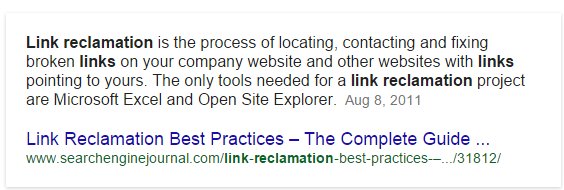
Link reclamation is the easiest way to earn editorial links to your pages from referring sites that mentioned your brand but didn’t link to you.
Regardless of what marketing you do — B2B or B2C — here are three sources of links you need to reclaim:
i). Brand mentions: This means aspects of your brand such as your site, events, courses, etc. Other sites could be mentioning your site, without linking to it. Brand mentions are the future of link building. Through link reclamation, you can request actual links be added to mentions that already exist.
ii). Product mentions: Several sites, media portals and discussion boards could be mentioning your product without linking to your sales page or homepage. You don’t need link building software for this. You can use the Rank Tank’s brand unlinked mentions finder tool to find these product mentions across the web.
iii). Personnel mentions: What about your team, your name, your nickname or your professional title?
All of these provide another opportunity to reclaim unlinked personal mentions and boost your search rankings based on your company or you being the search term. You want people to view your site with the authority to use you as the social bookmark.
Links connect the web together. Links exist because there are web pages and portals that need to share information with users, rank relevant content, push the drivel aside and prevent plagiarism or duplicate content where possible. That is the job of search engines and every SEO tool must play in their realm.
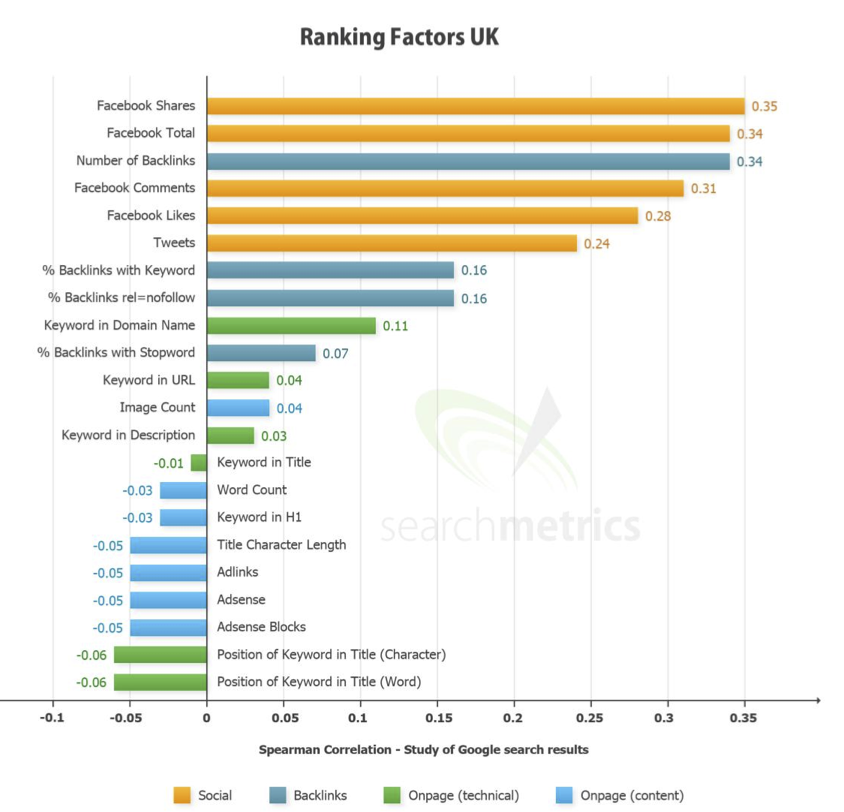
Who links to your site and how they link to it are more important to Google than virtually any other Google ranking factor. Data from Searchmetrics suggests that the number of backlinks is the third most important factor in the UK Google ranking factors.
In his book, Ultimate Guide To Link Building, Eric Ward shows you:
● How to build links
● How to gain authority and credibility for your website
● How to increase your traffic and rankings
Ward teaches with a deep understanding of link profiles, what makes them good and how to maximize the quality of links that point to your site. Understanding this means you won’t need expensive link building software but you may still take advantage of tools to make you more efficient.
Ward uses illustrated case studies, expert interviews and helpful resources in this book to drive his message home. You’ll find that getting backlinks can actually be fun, once you master the art of networking with bloggers.
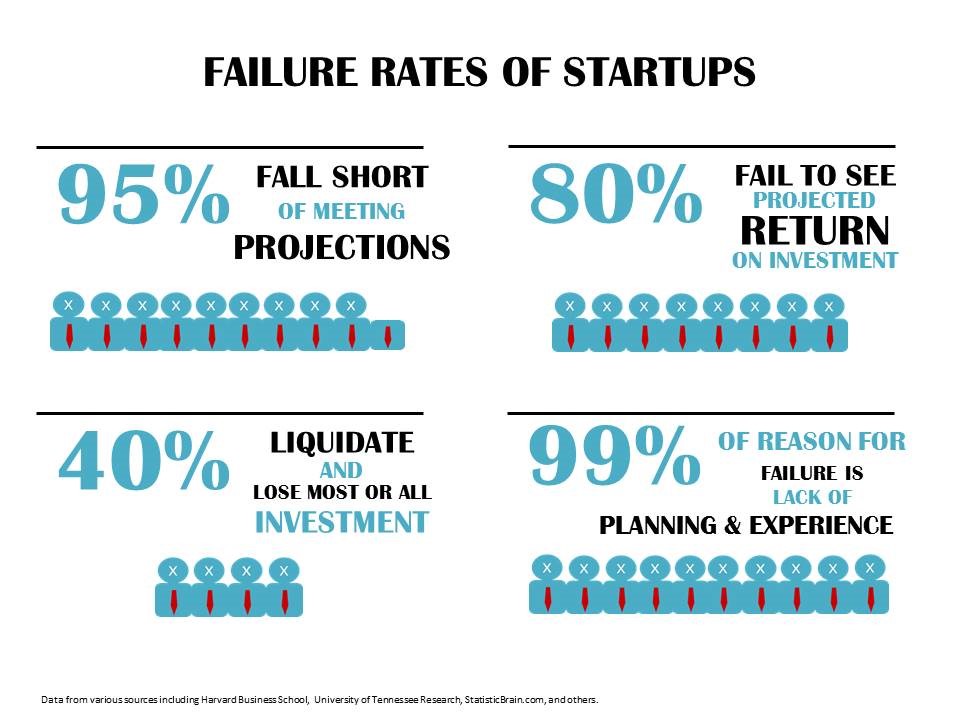
Getting more links will improve your search performance, increase leads to your business and increase your revenue. If you don’t get links to your site, your search rankings, traffic and leads will suffer. Your startup will fail.
According to Club Z, about 80% of startups fail to see projected return on investment, frequently due to a lack of planning and experience.
Before you can drive targeted visitors from Google and benefit from your site, you need to build quality links to your pages. Guest blogging is a viable and free way to do just that. As you contribute to industry blogs, you can speed up your rate of getting links by simultaneously reclaiming your brand mentions.
For example, someone could cite your domain name (e.g., dodocase.com) without linking to it. Before someone can visit that site, they’d have to copy and paste it into their browser or look for it via a search engine. But if the domain name was hyperlinked, when someone clicks on it, they’ll visit the startup site.
If you’ve been consistently creating fresh and useful content and promoting your site through social media, there’s no doubt that other sites are mentioning your brand name. Don’t let these mentions be a waste; reclaim them and be your own best search term. And that’s exactly what you can learn from “Link Building for Startups – Find Unlinked Brand Mentions at Scale.”
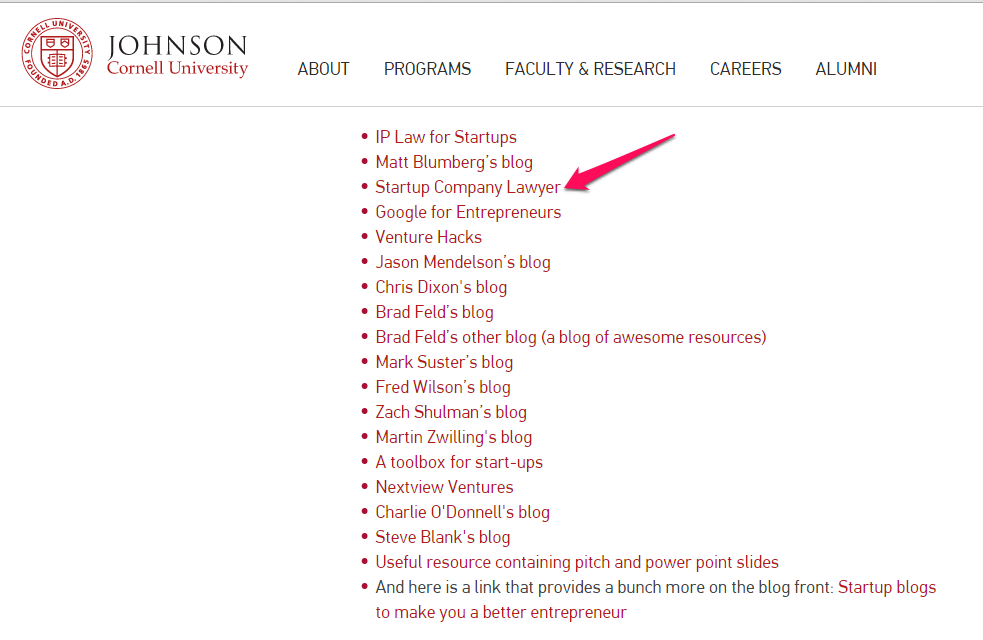
One of the most effective methods for getting links is through resources pages. With this tactic, Startup Company Lawyer got a link on the resources page of Johnson Cornell University.
Nonetheless, although contextual links are desirable and powerful, you still need to diversify anchor text. If all your links appear within the content, this may not seem natural.
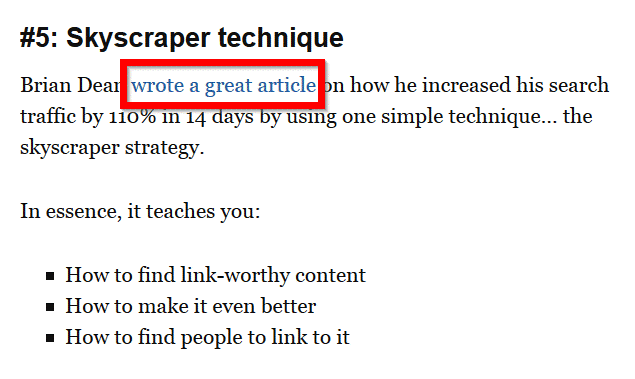
However, there’s no single one-size-fits-all approach to link diversity ratios. Depending on the domain authority and page authority of referring pages and their IP diversities, Google can use these factors to gauge and pass value to your links.
Different niches require different approaches to getting links. For example, building links to a niche site (e.g., a site focused on a specific topic or product) is a delicate process, because you’ve got to be mindful of the linking site — making sure they’re relevant even if they’re not too popular. But for an authority site, it doesn’t matter where you get your links from. It could be from an entirely unrelated web page but provided your site has some authority, Google will likely not view this as spammy.
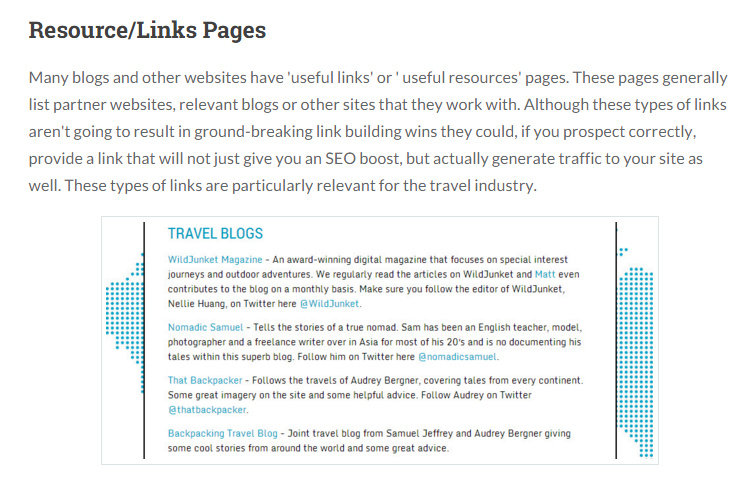
“How to Get Links on Resources Pages” is a helpful guide that gives you vital information on how to get the right links by capitalizing on resource pages — pages with plenty of linked-to resources (e.g., blogs, books, papers, resource works, images).
Conclusion
At the heart of every link building campaign is outreach. Whether you’re involved in guest blogging, broken link building, social media networking or blog sponsorship, you need to connect with people.
Get personal. Your target audience wants to connect with you on a personal level. They should want to make you a social bookmark. That’s the quickest way you can build a loyal audience, get referral traffic, improve your search traffic, increase your email subscribers and grow your sales.
Source: Neilpatel.com Blog

Mar 31, 2020 | Blog
Managing your own retargeting ads without a third-party app is available to any business through Facebook Ads Manager. By creating a Business Manager page and installing the Facebook pixel, you can set up, launch, and scale your own retargeting ads.
Ads Manager gives you access to every retargeting tool available to you on Facebook. This allows you to test as many different audiences and ad creative types as you want and analyze the full results of all your campaigns.
When advertising directly through Facebook there is also no additional fee outside of what you pay for your ads. On Facebook, you are only charged based on ad impressions, whereas apps or agencies include additional fees.
However, many small business owners starting out with auto-pilot apps may feel nervous about switching over to managing their own retargeting campaigns. A lot of this fear comes from intimidation of Ads Manager.
Ads Manager is a more complicated tool than an app, but with the many guides and free courses available to entrepreneurs looking to learn, it has become easier for beginners to manage and scale their own campaigns.
Building a retargeting strategy that scales
The goal of creating a retargeting strategy is to set up your campaigns in a way that allows you to scale your positive returns and convert more prospects into customers
The best retargeting strategy requires focusing equal parts on targeting the right audiences and using the right creative. Once you have both elements working in tandem you can be assured that every potential customer is being served the right advertisement at the right moment.

1. Creating retargeting audiences
After adding your Facebook pixel to your Shopify store, you will be able to create “custom audiences” in the Audience section of the Facebook Ads Manager, which are made up of people who have engaged with you on social media or taken certain actions on your website.
Here you can create audiences based on the following credentials:
● People who engaged with your brand on Facebook and/or Instagram
● People who visited your website
● People who spent a certain amount of time on your website
● People who visited specific pages of your website
● People who viewed a product (called “viewed content”)
● People who added a product to their cart
● People who initiated checkout
All of these audiences can also be defined by time frame, which allows you to create tighter audiences of more recent prospects and larger segments of those who visited your website as far back as 180 days ago
2. Segmenting your Facebook audience
With all of the custom audiences available to you through the Ads Manager, choosing which segments to target has a lot to do with the type of product you sell and your customers’ typical buying behavior
For businesses that sell impulse-purchase products that are lower cost, you may not need to retarget people further back than 30 days.
For higher-end brands or those selling big-ticket items, like mattresses or engagement rings, retargeting might take place over a 180- or even a 365-day window.
If you’re not sure exactly how long you need to retarget people, these are some of the most commonly used audience segments for retargeting:
● Social (Instagram and Facebook) engagers: Past 90 days
● Website visitors: Past 30 days
● Viewed content: Past 14 days
● Added to cart: Past 7 days
● Initiate checkout: Past 7 days

3. Building your funnel
Once you have your audience segments created, it is time to structure them into a funnel so you can monitor and optimize how each audience performs separately.
This can be done at the Ad Set level when you’re building your retargeting campaign. If you want to only target your social media engagers, for example, you will need to exclude those who have made it past that point and visited your website.
By taking this strategy and building out a full retargeting funnel that separates upper funnel (aware of your brand) and lower funnel (closer to purchase) audiences, you can successfully target all of these segments of customers at different stages of the purchasing journey.
You can see how each action implies the stage of the funnel that the audience is currently at:
● Social media engagers (upper funnel)
● Website visitors (upper funnel)
● Viewed content, which means viewed product page on Shopify (middle funnel)
● Added to cart (lower funnel)
● Initiated checkout (lower funnel)
A good retargeting funnel should exclude lower-funnel objectives (purchase) from higher-funnel audiences (social media engagers).
By properly applying exclusions to each audience in the Ad Set section of your campaigns on Facebook, you will successfully segment your customers out and avoid audience overlap.
Audience overlap happens when you are targeting the same segment of customers in two places, which creates unclear results as to which segment is driving purchases.
4. Setting budgets
Once you have set up your retargeting campaign, complete with multiple audiences for each segment of your funnel, it is time to start monitoring them and optimizing your spend.
Knowing how much to spend each day on each segment of the funnel requires some testing. Begin with setting low or moderate daily budgets for each audience (e.g. around $20 to $60).
You can decide how much to initially allocate to each segment of your funnel based on the estimated audience size given in Facebook Ads Manager:
● For smaller audiences, like those who abandoned checkout in the last seven days, you will likely only need a small budget to reach everyone in this segment.
● For larger audiences, like website visitors within the last 180 days, you might want to allocate a slightly larger budget in order to give your campaign the opportunity to reach enough people to drive conversions.
5. Optimizing your Facebook retargeting campaigns
Once your retargeting campaigns are up and running, you will want to check in on them each day to monitor results and make optimizations to improve their performance.
Optimizations are usually done by decreasing or increasing budgets based on how many purchases you are getting and, when it comes to retargeting, the frequency of your reach.
Frequency refers to the average number of times a person within one of your retargeting audiences is seeing an ad for you over a given period of time. Checking on your daily or weekly frequency for each audience will ensure you aren’t over- or under-serving your campaigns to the same people.
As you adjust your budget, you will notice your frequency changes. Once you’ve tested out different budgets to find which delivers the best results, you should also know what frequency is ideal for each segment of your funnel. This will allow you to monitor frequency and make sure it stays at an ideal level, regardless of the size of your audience.
Source: Shopify Blog






 WhatsApp us