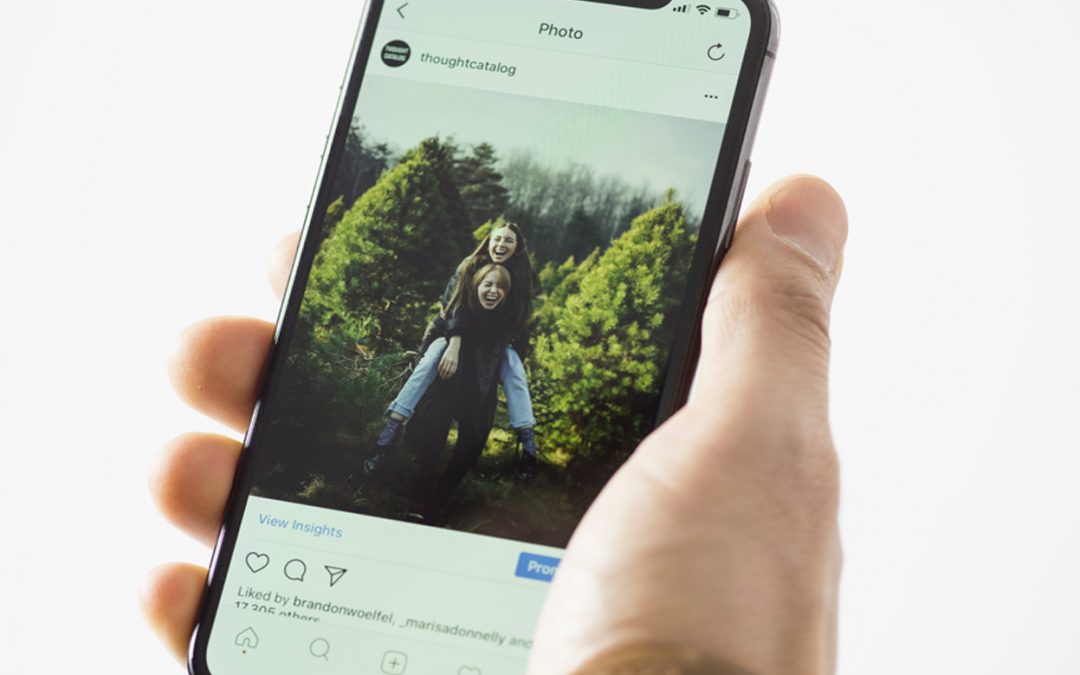
Some of you with Instagram accounts may have noticed that the little thing under your post looks unnoticeably yet so obviously different. Instagram has rolled out an update where it hides your likes on your posts. This update is currently still in its testing phase, and only certain countries or accounts are affected by it.
This is what it looks like with no likes displayed.
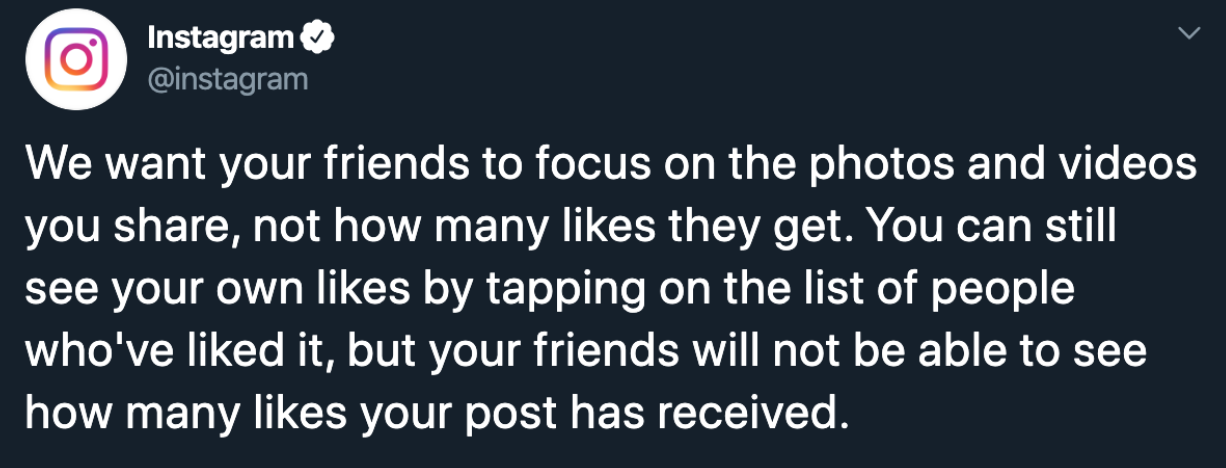
So, the question here is, will this affect your social media presence? Is this a good thing or a bad thing? In their defence, Instagram’s reason for removing the number of likes on your post and the number of views on your video is to improve the lives of consumers. They also quote “we want your followers to focus on the photos and videos you share, not how many likes they get.”
Currently, the countries affected with this update are Australia, Brazil, Canada, Ireland, Italy, Japan and New Zealand. There are also users in Hong Kong reportedly don’t see the number of likes anymore.
How will this update affect your social media presence? And how are the users reacting to this?
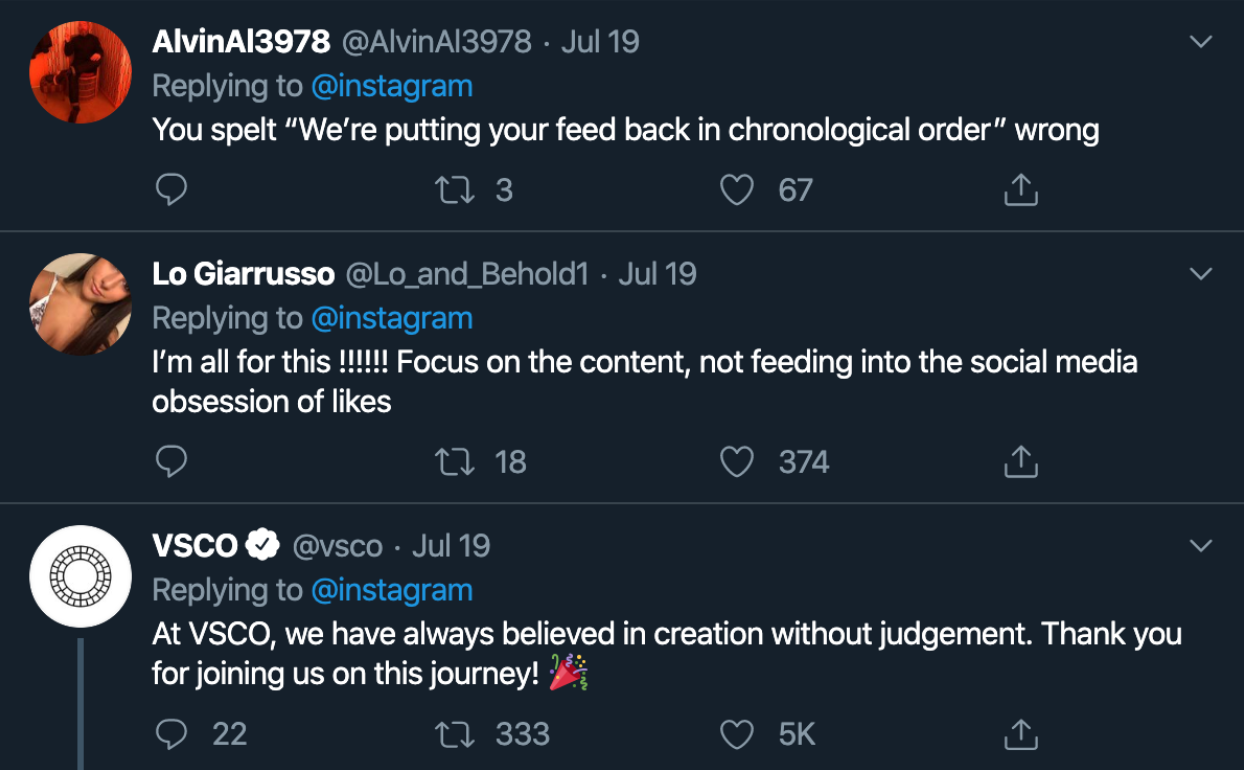
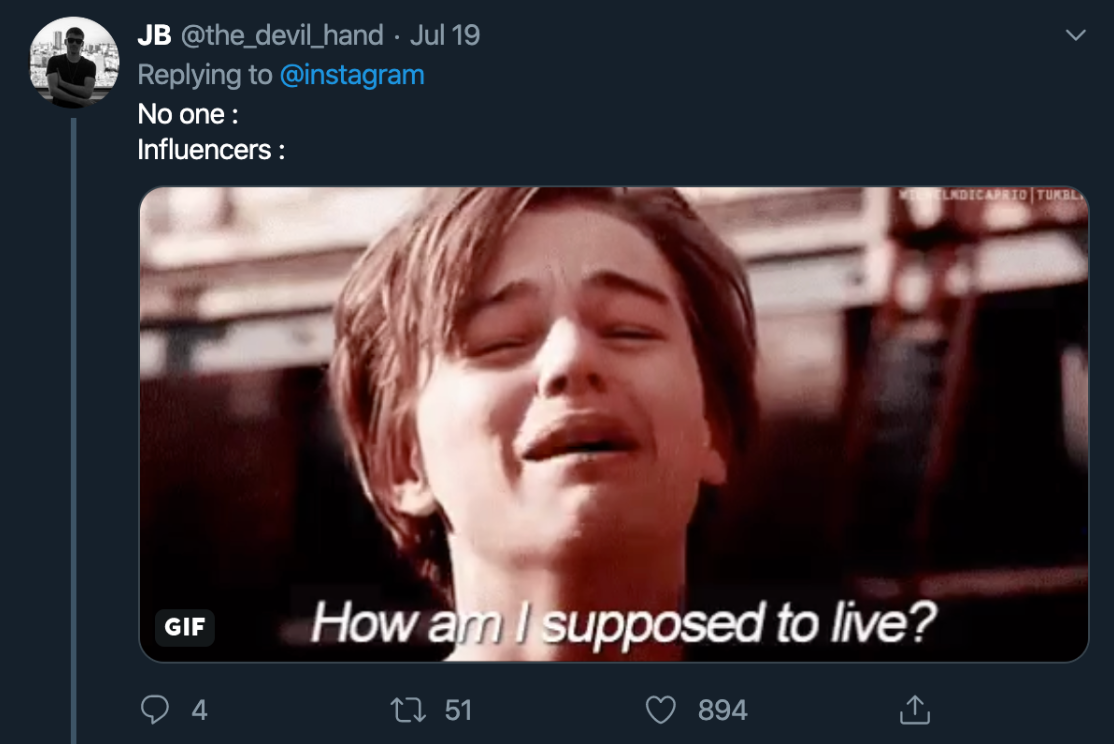
While some people are reacting negatively to it, claiming “nobody asks for this”, some people love this new update- giving them less anxiety to keep checking on how many “likes” their posts have achieved.
Influencers and KOLs are making a huge deal out of this because they claim to rely on the engagement rates as their KPIs when it comes to sponsored posts. Just like the number of followers they get, the number of likes is equally essential to them to prove that they have high engagement rates.
Does this matter? This is exactly what Instagram is trying to banish. The obsession with the number of likes on users’ posts.
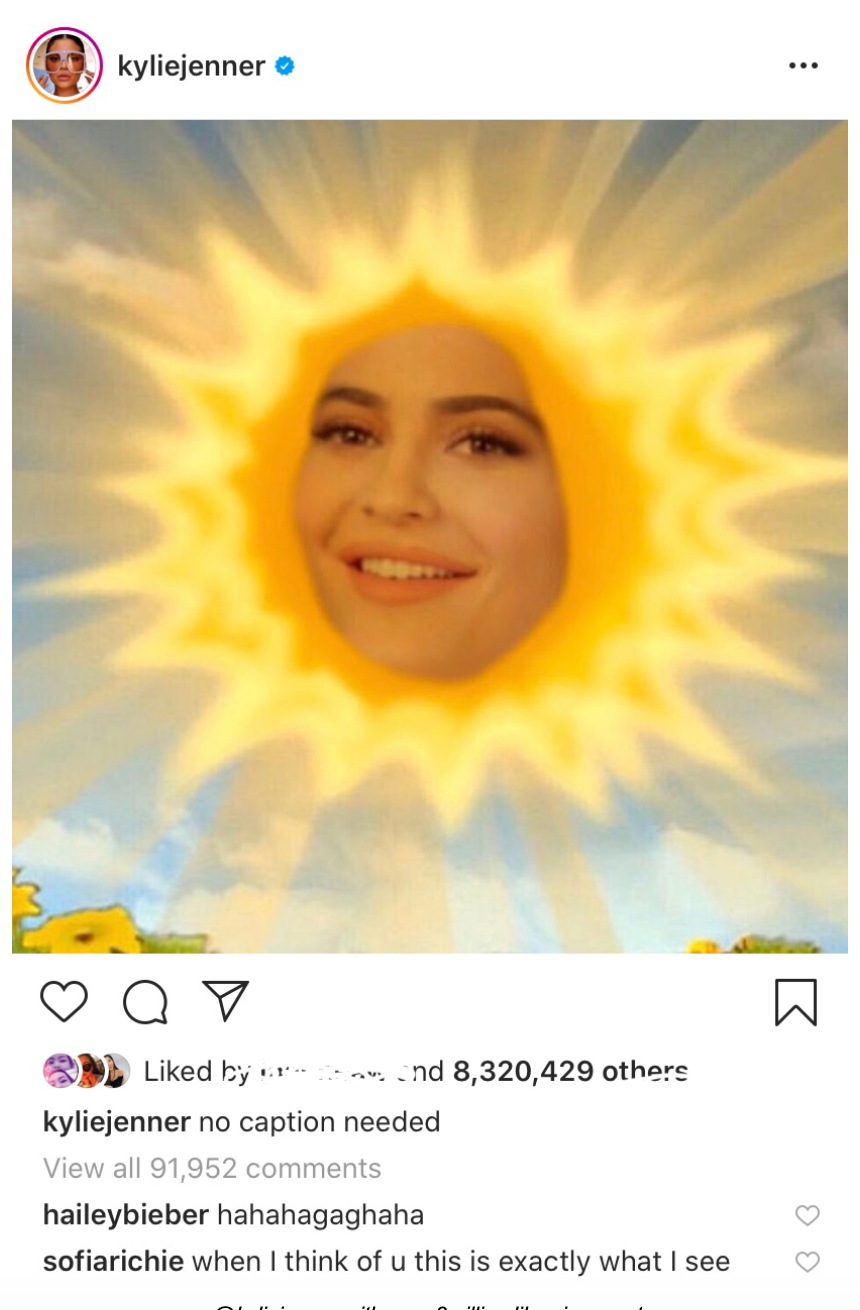
@kyliejenner with over 8million likes in a post
How will it look for the world of marketing without likes displaying?
Hiding the likes on Instagram posts will help boost authenticity in the posts and might resolve the problem of fake data. For years, users have been buying likes to give their profile a boost and to appear relevant. Without the display of the number of likes, the pressure of needing to keep up with Instagram likes can be deterred. Social media can now be authentic and postings don’t have to be so heavily planned and curated- just post whatever you like!
Everyone is now equal when the likes are hidden. You’d be surprised at how many people’s self-esteem relies on the number of likes they get on one post. The anxiety caused by waiting on the likes to keep rolling in is a real thing and can be considered worrying. With the likes hidden, this issue can be defeated when users can post without thinking and worrying about the number of likes they would get.
In conclusion, the removal of likes does not negatively affect your social media presence. Instead, from a positive perspective, users are more likely sharing their posts with more freedom. They will no longer be bounded with the idea of “more likes equal higher self-esteem”.
How to grow your Instagram followers the “organic way”
Social media plays a great part in growing your brand digitally, especially if you are new and taking baby steps in promoting your brand.
Of course almost every brand has a Facebook page, but what about an Instagram account?
According to Instagram, 80% of accounts follow a business on Instagram. And there are over 500 million Instagram accounts that are active on a daily basis. Imagine how many users your brand can reach out to via this social media platform?
So how do you reach out to these users via your Instagram account?
Here are a few things to observe:
Your content
Make sure your content on your Instagram is consistent, or tells a story or your brand. There are a few way you can make your content work. Because Instagram is a photo-based social media platform, what your followers first see when they visit your Instagram account are the photos on your account. So be sure that your Instagram page is aesthetically attractive and interesting.
Say you’re running a travel agency, and you want to gain more followers on your Instagram. Your Instagram account should be filled with pictures of breathtaking images of to attract these wanderlust followers.
If your brand is selling designer goods, bombard the page with all the pretty designer clothes and bags and shoes.
Make your content as relatable to your brand as possible, you catch the drift.
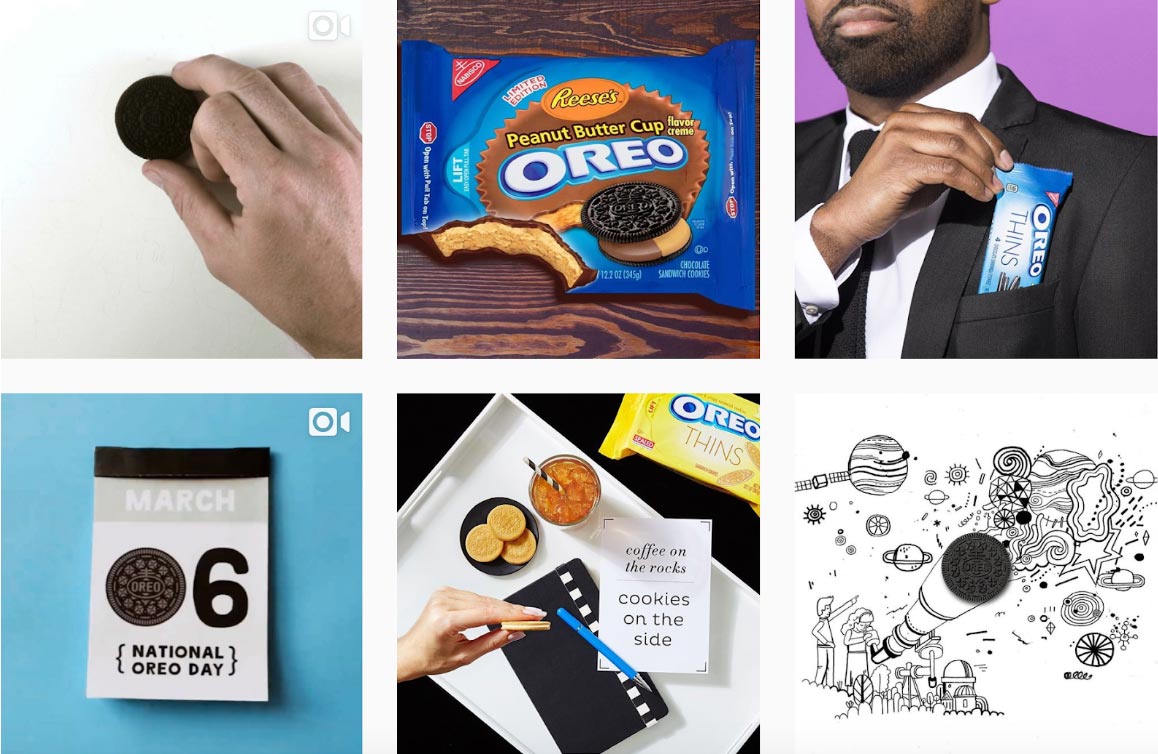
Source: Instagram @oreo
Make your feed aesthetic
Once you have your content ready, it’s time to prosecute them in the best way you can.
Creating content may be easy, but making the content look beautiful and aesthetic as a whole is a challenge.
If your brand has a primary color, make use of it as your primary colors in your theme. A few common colors that are bound to attract the eyes are red, yellow and blue.
Bear in mind; different themes attract different followers. Hence, a black and white feed will attract followers who are into artistic and dark mood themes.
If you’re planning on using filters on your pictures, make sure your filters are always consistent.
This will create an automatic theme for your brand and followers like consistency and uniformity in a feed.
A theme can easily attract the attention of a user if it’s so aesthetically presented that the user will not hesitate to hit the “Follow” button.
So before you start posting your content, make sure you plan your theme colors, filters and also mood before you start.
Strong hashtag game
10 years ago when you see #, you call it the “pound button” on your phone dial screen. Show this symbol to the kids now and they’ll laugh at you for calling it the “pound button”.
The hashtag was introduced and used back in August 2007 by Chris Messina, a techie from San Francisco and a former Google developer, on Twitter.
Now hashtag is so heavily used in all social media platforms.
Why is a hashtag so important?
A hashtag is used by social media users to search for a specific event or topic or category in the social media world.
The importance of including hashtags is significant as it brings your post out to the public and everyone searching for that specific hashtag will see your post. The likeliness of them clicking into your picture is higher if they found your picture attractive and interesting, which also leads to them clicking into your Instagram account.
Here are some hashtags that you can use, categorized according to the relevance of your Instagram posts.
You can go up to 30 hashtags per post to maximize the capability of the hashtag game, however, is 30 hashtags per post necessary? Some will say that it will bring down the credibility of your post, or even, making you look spammy and amateur. Instead, use about 5-11 hashtags per post, and make sure they’re relevant and match your brand and pictures.
However, you should create your own brand hashtag so that it is specifically for your brand.
Your brand hashtag does not necessarily be just a one-word hashtag. Play around and create a phrase of your own!
Promote your Instagram on other platforms
If you already have a bunch of followers on your Facebook or Twitter or any other social media platforms, you can post a shoutout there and ask your followers to follow you on your Instagram account too.
Add your Instagram handle on your profiles and even on email signatures.
If you already have a website, add a widget to your website with your Instagram live feed and a clear “Follow” button for the ease of your new followers.
Get boosted help from KOL or influencers
Key opinion leaders aka KOL and social media influencers are the experts in product knowledge and has influence in the social media world. These influencers usually have a big scale of followers who they can sell a product to and easily get their attention.
Collaborate with influencers especially if your brand is new and needs to get some attention.
KOLs and influencers can be a vast of variety, ranging from superstar celebrities or just someone with a lot of followers on their Instagram.
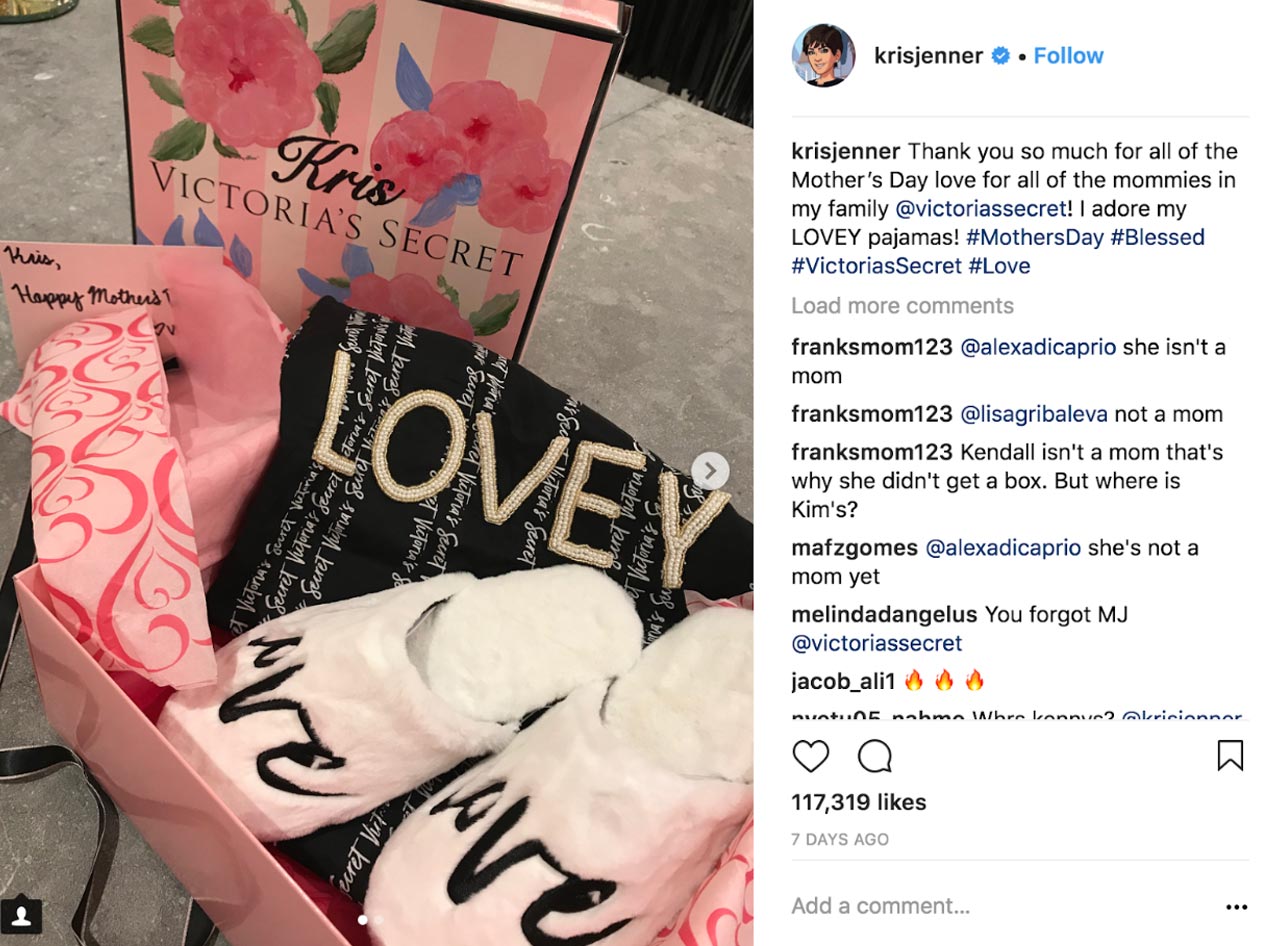
Source: @krisjenner
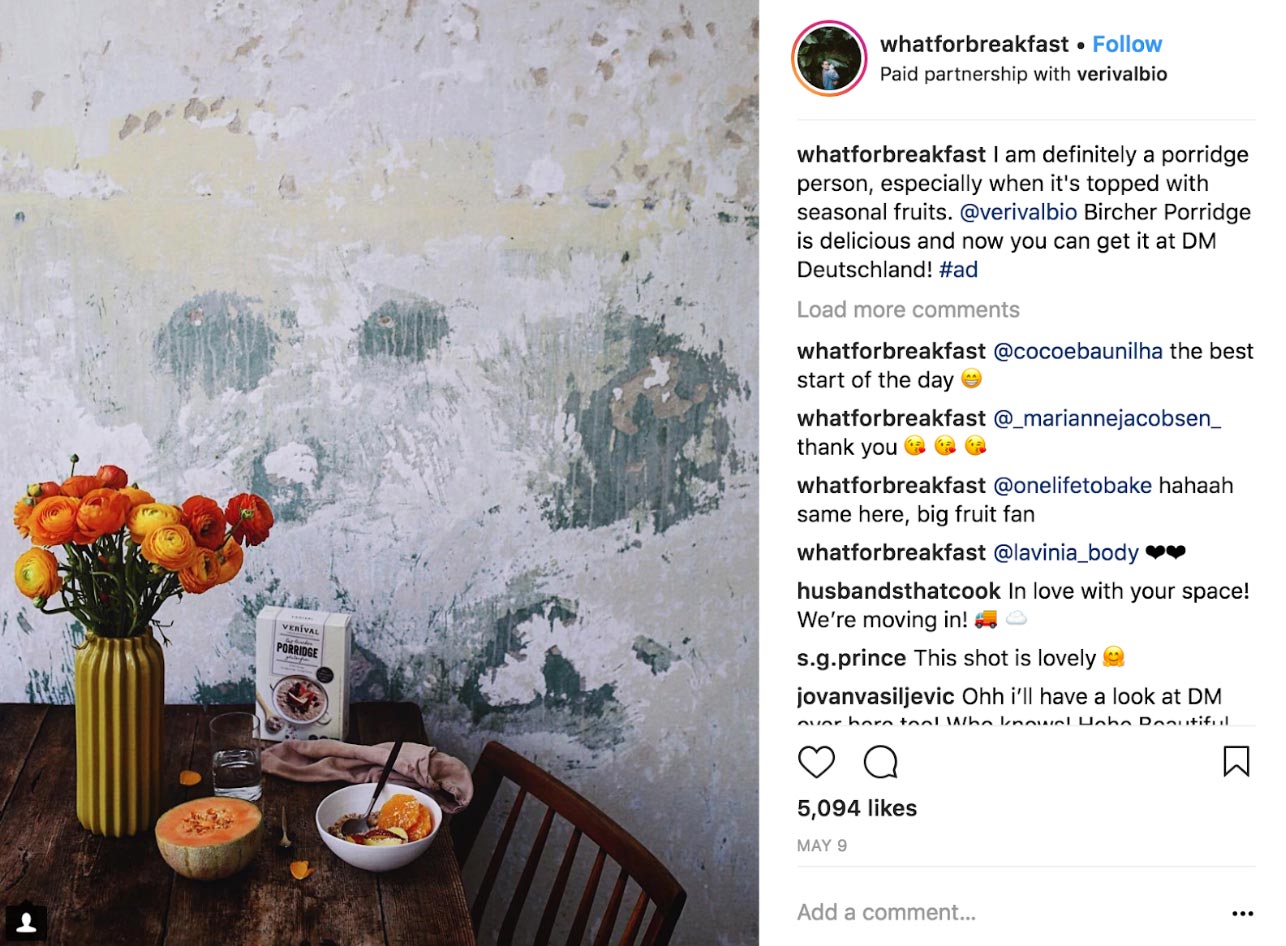
Source: @whatforbreakfast
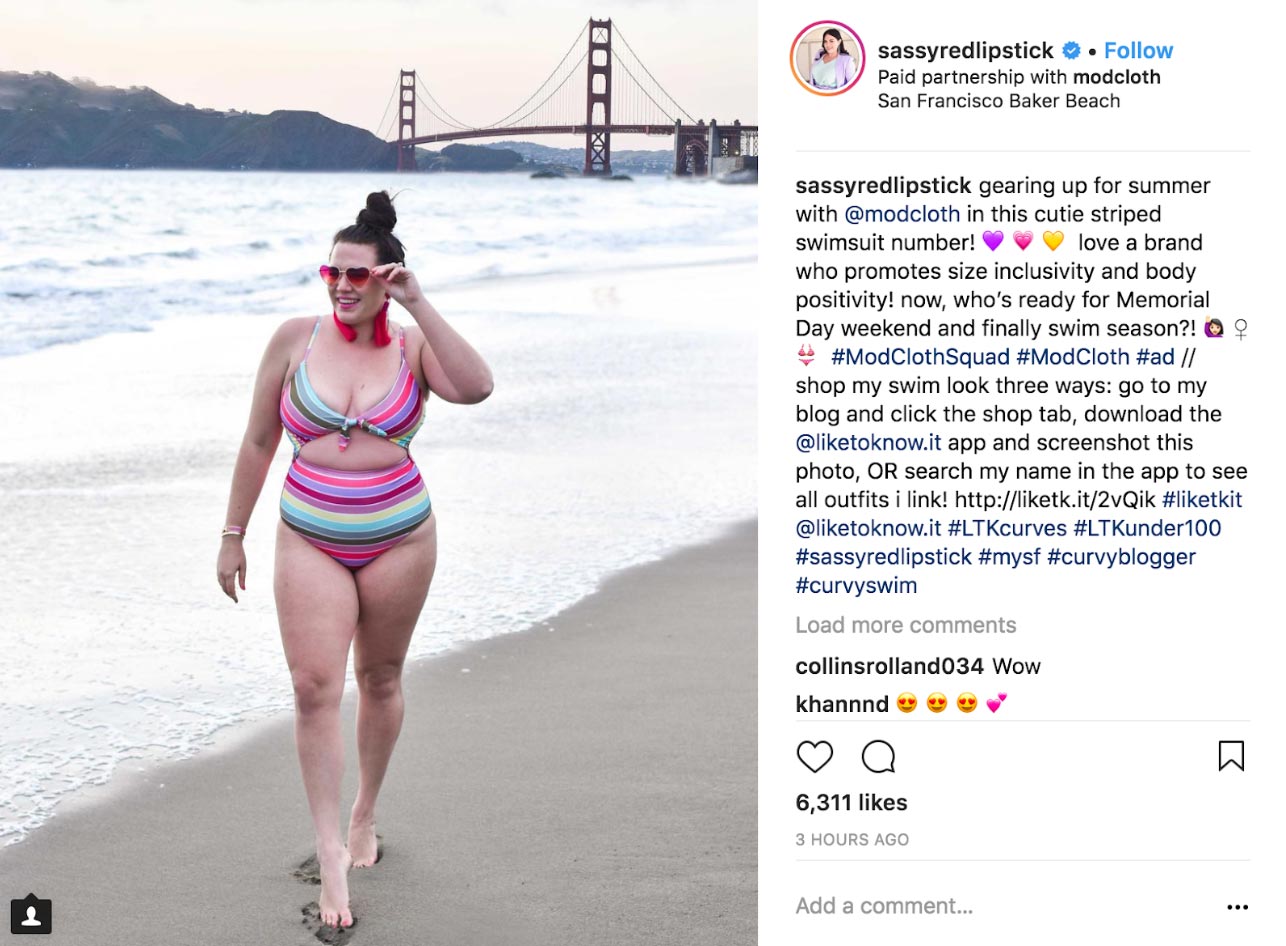
Source: @sassyredlipstick
When working with KOLs, not all have the same style or price package. You can engage with a local influencer with not as much followers who will contribute a post on their Instagram for free, given that you send them your brand products for them to review. Some might charge you a hefty amount but will be able to provide higher ROI to your brand. It all comes down to your budget and whichever you are comfortable with.
Just make sure you discuss with the influencers on what you are expecting from their posts and what is the target you’re trying to achieve, and they will be able to give you some ideas and feedback.
There are plenty of ways to boost your organic followers. So here’s the breakdown of what we’ve learned:
Interesting content
Consistent visuals/filters
Hashtags, hashtags, hashtags (but not too many)
Get promoted by KOL and influencers
It takes time to build a massive amount of followers, so just be patient and start off by inviting your friends and family to start following your page, and get them to invite their friends.
Instagram has been updating its features over the months and each of their updates has never disappoint us, except for the algorithm part. There’s quite a number of updates and we are here to take a look at all the new features that rolled out in 2018.
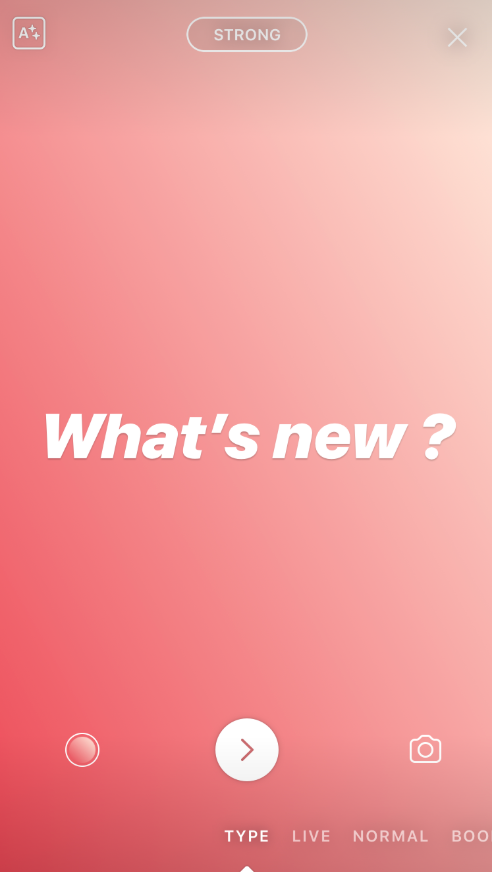
1. New Fonts and Type Mode
Before this, we were only give one font to place over our Instagram stories. As of today, we’re given 5 different fonts – classic, modern, neon, typewriter and strong.
Remember when you’d had to take a pic with a black background just to type an essay of your rant. With the Type Mode introduced, gone were the days where you’d want to rant on something but don’t need a picture for that post.
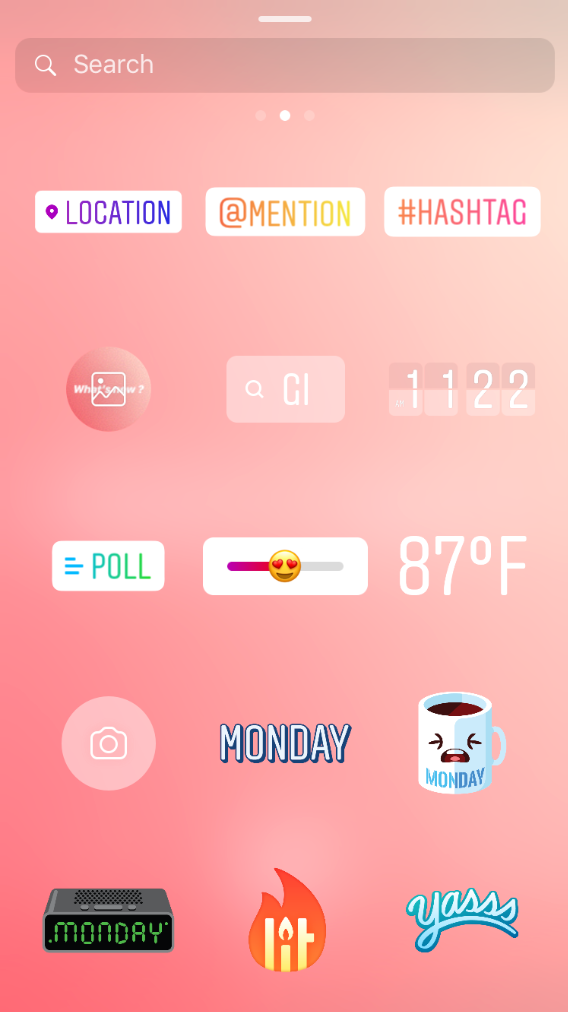
2. Poll, Gifs, Hashtag and Mentions
You may also notice that Instagram has added the Mention and Hashtag in the pull up menu. Now you may tag people and hashtag with a more enhanced color. It’s nothing different than your good old way of just adding the @ before tagging people and # before you type in your hashtags. The Poll feature was a great hit when it was newly introduced. Everyone started asking questions in their stories which is a great way to interact with your followers. However, a lot of people didn’t know that their voting is NOT anonymous, until they found out the hard way- voting jokingly that someone does not look cute in their new outfit, then being confronted by that person. Ooops.
The most popular and best new update to our Instastory game is the GIF feature. We were blessed and grateful enough to have the IG stickers and emojis to be added in our stories, but Instagram heard our prayers and kept up with the trend to throw in GIF in this bundle. Instastory has never been more interesting and fun to watch.
Recently, Instagram has also introduced another poll feature, called the emoji slider. You can no select the emoji you want on the slider, and your followers will vote by sliding. The results of the poll is based on the average sliding meter.
3. Mute stories and posts
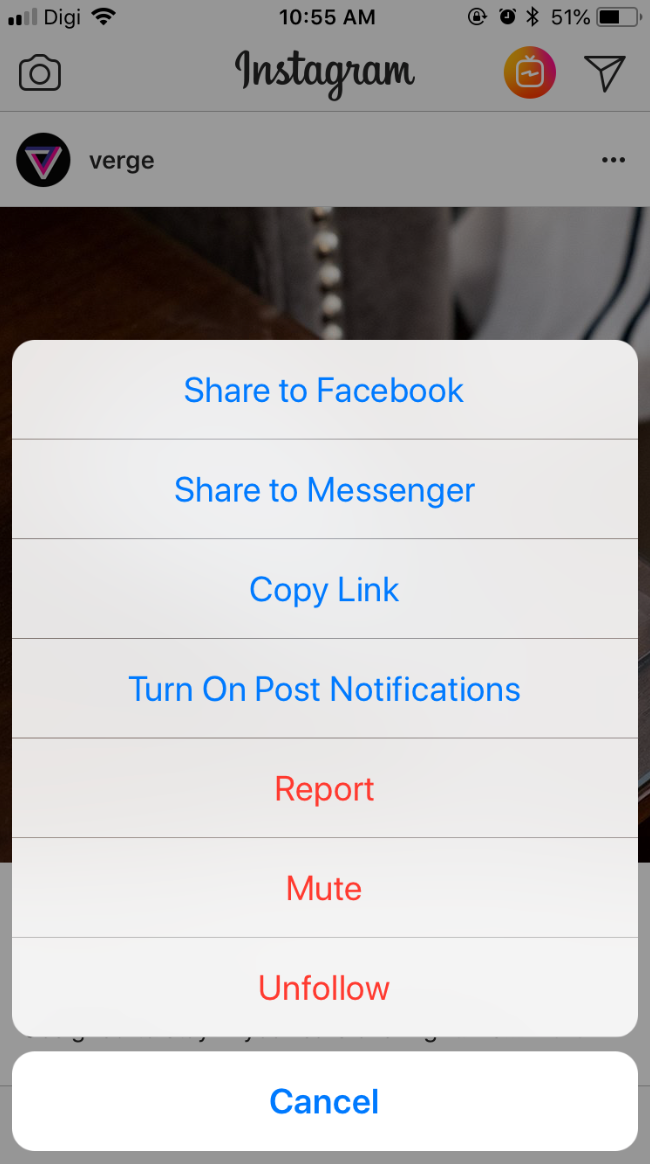
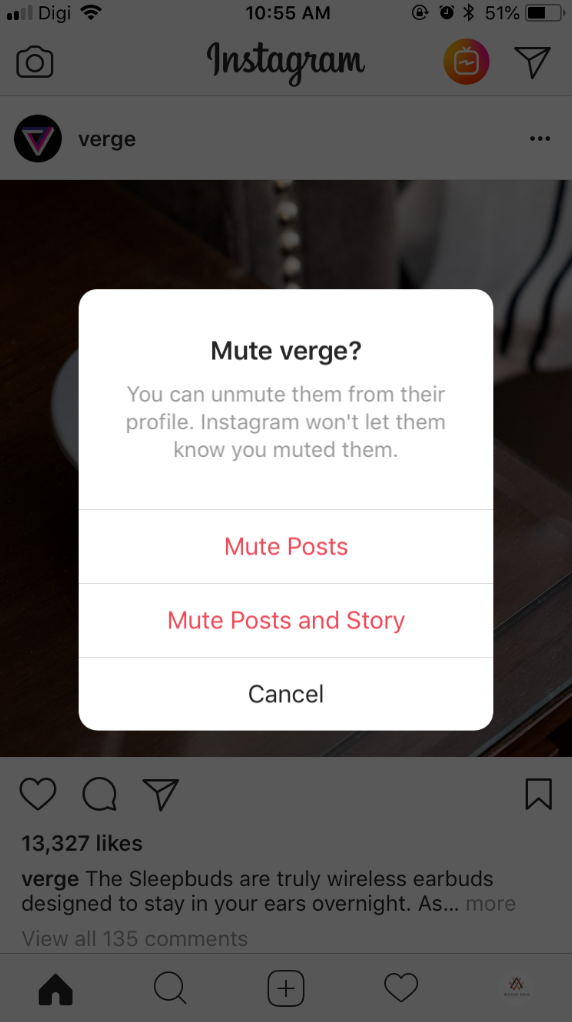
When Facebook allowed us to unfollow someone’s posts without having to unfriend them, it was the best idea ever. You know what we mean. There will be someone in your friends list that posts annoying and uninteresting opinions on their Facebook and you just do not want to see any of those. But at the same time you can’t unfriend them because of some reason. So UNFOLLOWING their post was the best thing ever. You remaind Facebook friends, but you don’t get their annoying updates. Instagram first had this feature only on Instastory posts. However, over the past few months, this new added feature was announced and everyone was ecstatic. You can now mute posts!
Here’s how:
Press the three dots on the top right of the post.
Hit “Mute”
Choose to “Mute Posts” only or “Mute Posts and Story”.
P/S: We did not mute @verge posts nor story, it was merely an example, we promise.
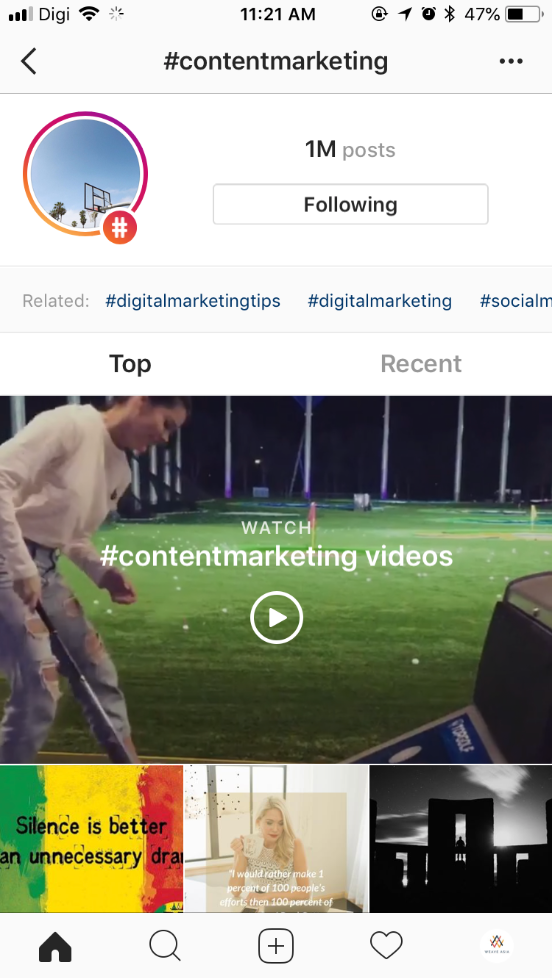
4. Follow hashtags
This is a great new feature because you no longer have to go to the discover page to search for hashtags and scroll through your favorite hashtag topics. Hashtag following is so convenient now as they appear on your timeline as well. It usually shows content from the most popular and most liked posts. We believe the certain account’s post will appear frequently according on your own interaction as well, for example if you liked the hashtag post shown on your timeline, its account’s posts are more likely to appear on your timeline.
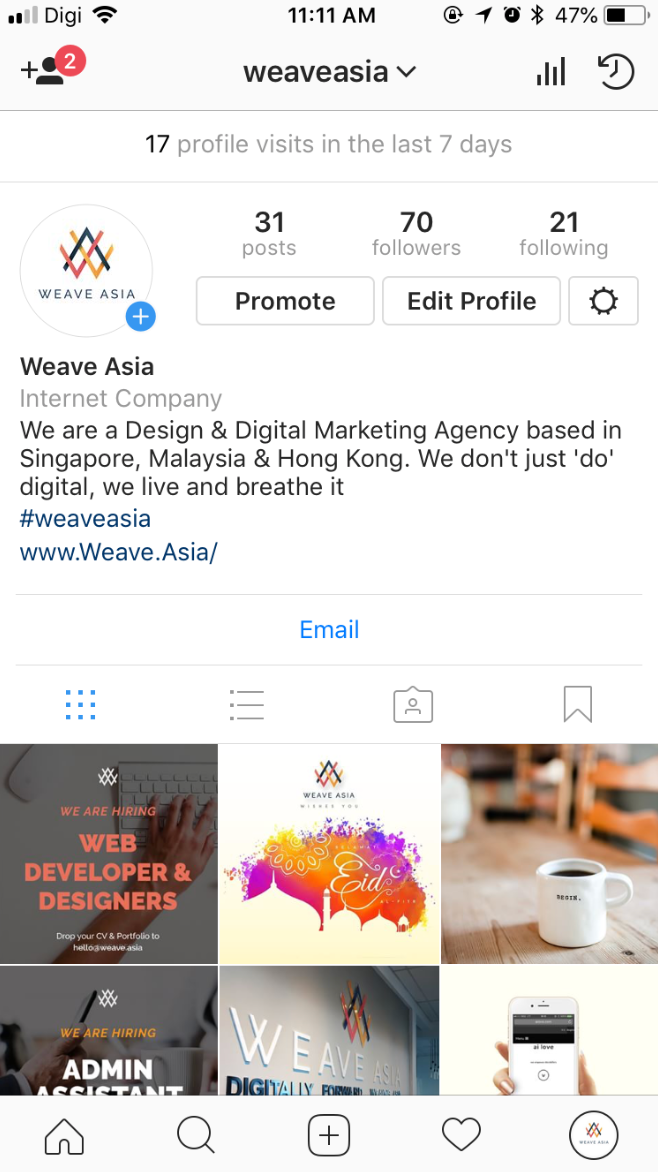
5. Adding username and hashtag on your profile
Useful for anyone with secondary account and especially if you want your brand hashtags to be known. Great feature for companies with sister brands and want to get the brand out there in the Instagram world. It’s convenient now because you can just simply hit on the username or hashtag and you’d be brought to the page or hashtag posts.
6. IGTV
This brand new feature was quite confusing at first because we don’t know what’s the purpose of this. After a while, it hit us that it’s just like a YouTube channel inside the Instagram portal. It also makes sense this feature exists because everyone knows that you can only post 1 minute long videos on your Instagram post and 15 seconds videos on your Instastory. IGTV allows videos longer than 1 minute to be posted on your Instagram account. Social media influencers and especially YouTubers could make great use of this IGTV. Notice how they would promote their new videos on YouTube on their Instagram posts or stories to have their followers watch them? With IGTV, their followers do not need to exit the Instagram app and could just watch their videos via IGTV.
7. Video Calling
YES! You can now do video calls via Instagram! And word of the mouth is, it supports GROUP VIDEO CALL at up to 4 calls
If you hadn’t notice, there is a video icon in the DM now.
The best part is, you can multitask while video calling. As in, you can continue scrolling on instagram. This is great because even iPhone’s FaceTime has yet to allow a group FaceTime call.
Is there any feature that we’ve missed out? Which one is your favorite feature of Instagram?
Remember in the days when we had to carry around a digital camera just in case there’s a photo worthy moment to snap? Ever since smartphones were invented, we’re blessed with the convenience of a 2-in-1 technology device.
You may argue that a phone camera will not be able to capture pictures as great as a digital camera. Well, here’s some photography apps that will change your mind because yes, a smartphone can definitely capture pictures as awesome as a camera.
1. VSCO
VSCO is one of the most popular photo editing app downloaded. It has a load of filters and its photo editing tools are easy to use and pretty self explanatory. There are some free filters for you to download, as well as purchasable filter packs. The filters come in different themes and moods, depending on how you like your photos to turn out. On top of that, VSCO also has a community of photographers to share their photos, and you can join in the fun as well.
2. Snapseed
If you’re a beginner or an advanced iPhone photographer, Snapseed is the one for you. It’s versatile as it can be easy for beginners to use, yet has the comprehensive tools for advanced photographers to play with. Similar to VSCO, Snapseed has filters and editing tools. Snapseed has extensive editing tools and you can do more fine photo editing with this app. Photos can be enhanced with the Tune Image tool, which allows you to adjust your photo contrast, saturation, highlights and so on. Not only that, you can remove unwanted items that appear on your photo by simply using the Brush tool.
3. Enlight
If you are thinking of editing just a certain part of your photo, perhaps, just a splash of color on the grass; or giving your photo an artistic feel by adding some filters but not on the entire photo, then Enlight is the app for you. Enlight has filters that are different than the VSCO and Snapseed apps. It provides a filter that could change your photos into a painting or a sketch. Not forgetting, Enlight has a photo blending feature that allows you to blend to photos into one artistic looking photo. Back in the days, these photo editing skills require someone with the knowledge of Photoshop, now, with apps like these, you don’t need to be a professional photographer to do that.
4. LensDistortion
Your photo is done with some tweaks and editing with the perfect filter, but it’s still missing a little touch. Perhaps just a little lens flare would make the photo pop even more. Lens Distortion gives you the added beauty and dramatic effect on your photos. You can add rain, snow, sunlight, lens flare, shimmer or glitter on your photo without looking too tacky. You can easily adjust and play with the opacity of the overlay you add. Now, when we say it doesn’t look tacky, we mean that less is more. So don’t overdo with the flares and effect and your picture will look awesome.
5. Mextures
Now, if you like creative and distorted colors in your pictures, this is the app for you. Mextures will give your photos a vintage feel. The filters in this app are leaning towards the vintage film effects and it is incredibly gorgeous. You can add grain and gradient on your photo and easily adjust it with the layers you can pile on your photo. If you like the edits on your photos, and would want to apply them on your future photos, you can save your edits as presets so that you don’t have to go through the hassle of fine tuning it all over again.
6. Facetune 2
Whether you’re taking a portrait of your wife, or just a selfie of yourself, you’d always want to tweak your face a little to look a little more photogenic. Facetune 2 is the saviour if you’re having a bad skin day and would like to get rid of the blemish on your face. If you’re looking a little pale, and want some tan, leave it to the app. Don’t have pearly whites? No pearl-blem! Facetune 2 will help you whiten your teeth and even change the color of your eyes!
7. Foodie
As the name says it all, it’s THE app if you’re taking pictures of your food. Foodie has a bunch of filters that will make your food look even more delicious than it already is. It has filters groups that cater to what food photography you’re capturing. Ranging from sandwiches, ice creams, eggs, pastries, pasta and so on. So if you’re at a barbecue and would want to take a picture of your grilled steak and burgers, select the “Meat” filter and it will make your steak look so mouth-watering delicious. Or if you’re having a margarita by the beach and want to take a picture to show off to your friends, hit the “Drinks” filter and the colors of your cocktail will pop even brighter. This app is not just limited to just food pictures, you can even use it for a selfie or a scenery picture. You just need to play around with the filters and choose which theme you like.
8. Instagram
Last but not least, and probably the most used photography (and community) app, is Instagram. Do not underestimate its filters, for Instagram was the pioneer photography app to give us filters. Remember the first few filters? Valencia, Kelvin, X-Pro II, Hefe? Back then, all pictures were heavily filtered with Instagram filters. Today, Instagram has over 20 filters and editing tools that are so easy and straightforward to use, it’s just a few hits of buttons and you got yourself a great artistic photo. Not forgetting the added bonus features of Instagram where you can add fonts, stickers and GIFs to your photos. You can do this by uploading your photo on your Instastories, then add on these stickers and so forth, and you don’t exactly have to post it up on your Instagram, you can just save them to your camera roll. Simple isn’t it? Indeed it is.
Hence, with technology moving forward day by day, a lot of things have been made simpler, convenient and fun. Try on these apps and play around and get a feel of it before deciding which is more suited to your preference. Sometimes you might need to even use more than 1 photography app to get the perfect photo. The key here is to find the mood and theme that you like and go with it.
We all have to admit, social media plays a big role in our lives when it comes to making an announcement, or sharing what you’ve been up to recently, or to show off to your friends where you’ve traveled to, or simply a place to rant and vent.
However, there’s always someone in your friends list that you didn’t quite want to see some of your stuff.
To make it an easier relatable example, let’s pick a focus- Work.
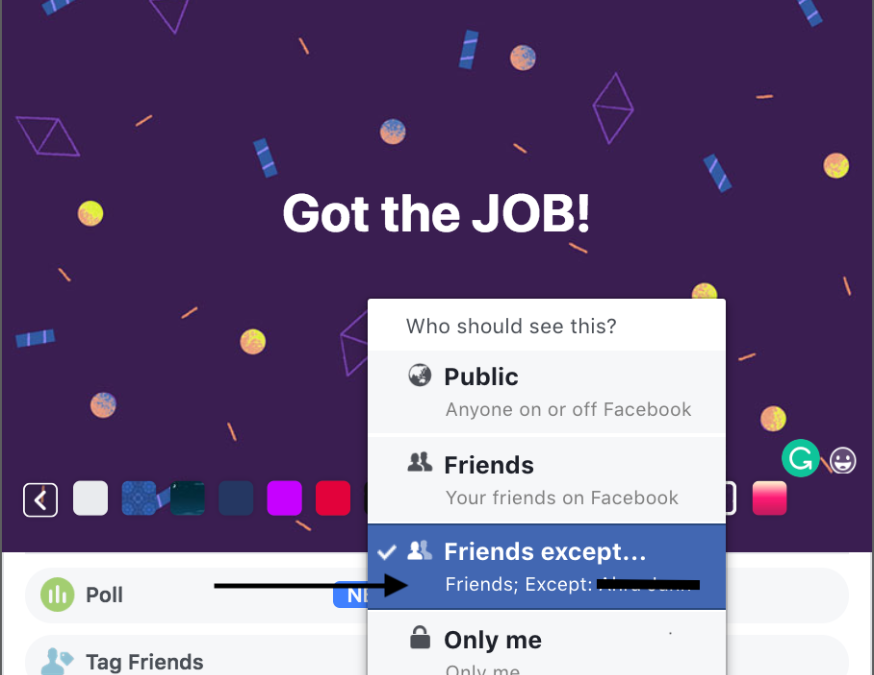
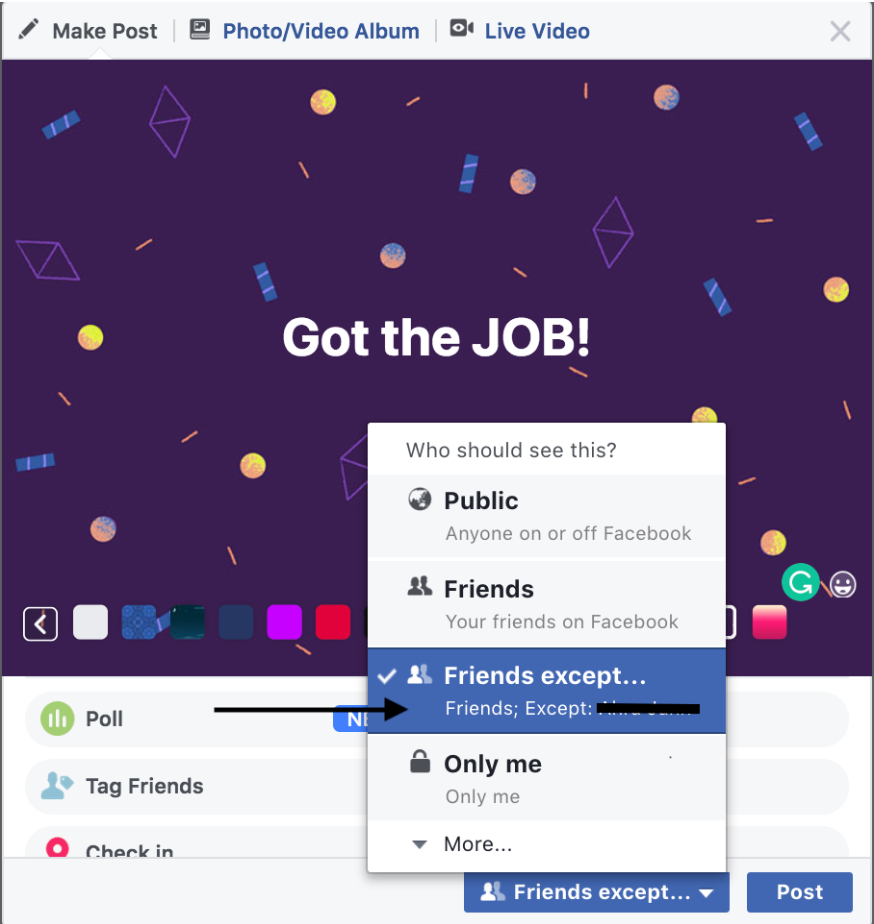
Scenario 1: You were scouting around for a better job and you finally got an interview, or even better, you got THE job. You want to share it with your friends and family about this great news, but you’re friends with your current boss on Facebook. And you really, really want to write a Facebook status update. How do you do that without your boss seeing it?
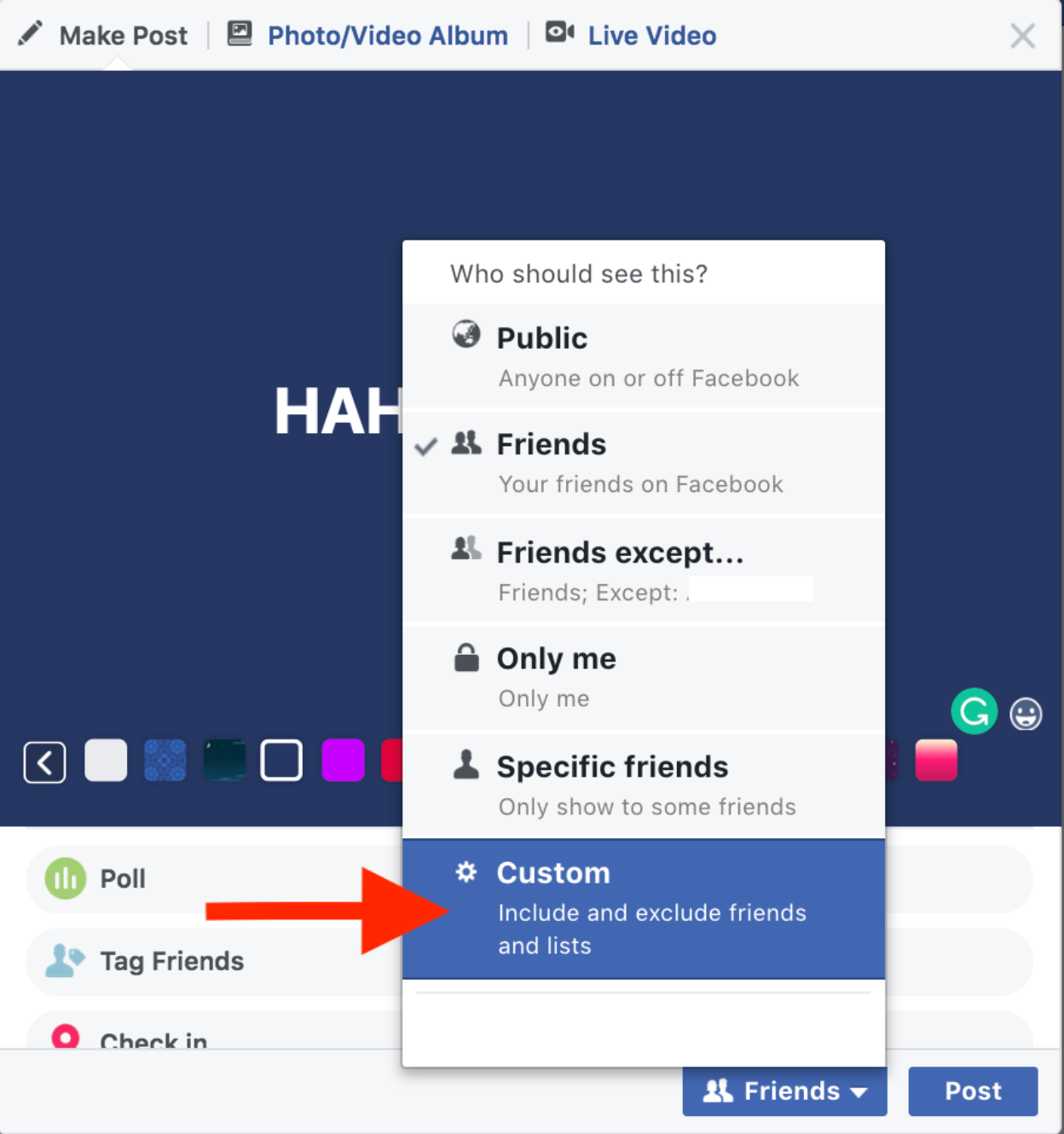
Click on the button next to the “Post” button.
Click “Friends except…” and a pop up of your friends list will appear.
Select the name of the person you do not want to see this status (in this scenario;your boss)
Post it.
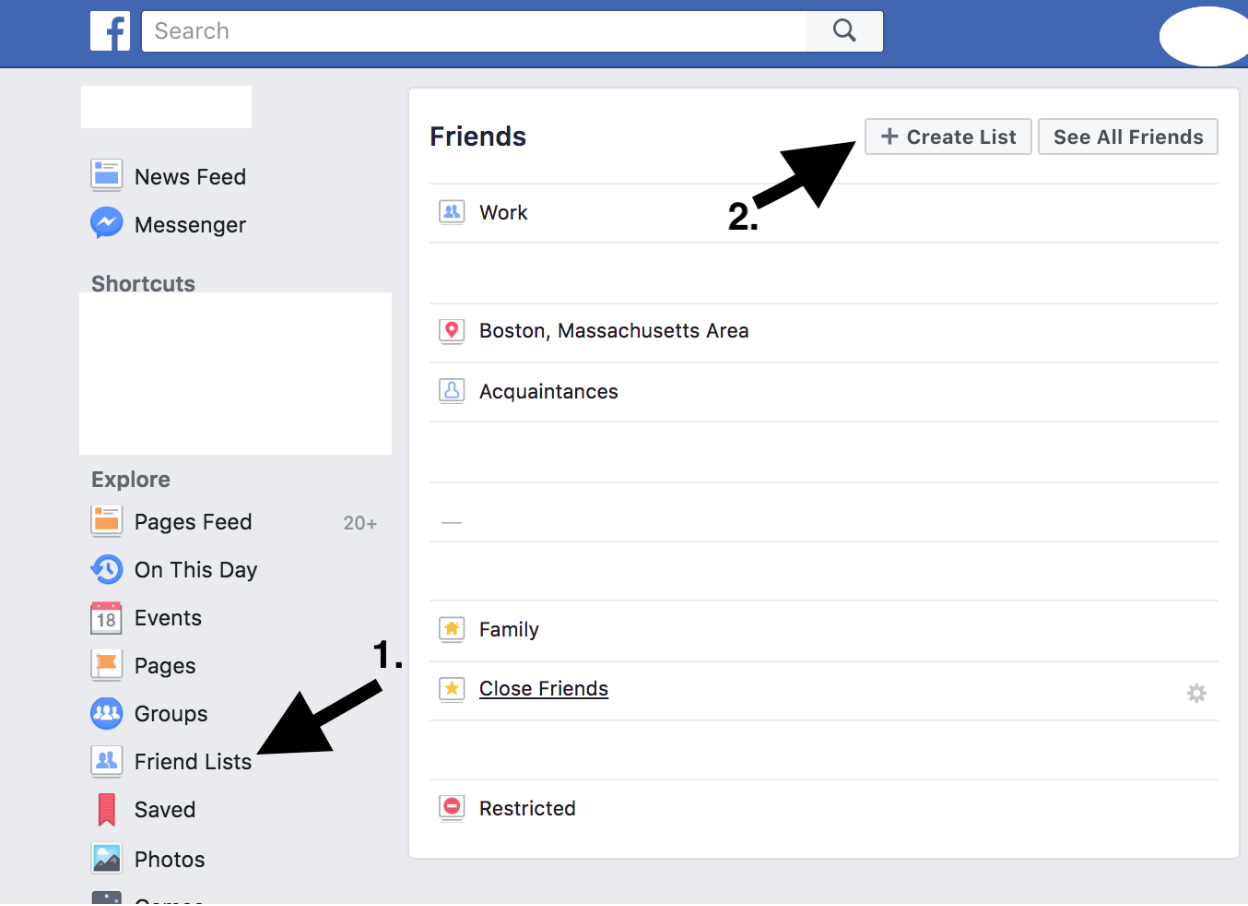
Scenario 2: You and a few other colleagues went out to have some drinks, did some outdoor activities together, etc. except you didn’t invite that other few colleagues that annoy you. But you want to post pictures of you and your non-annoying colleagues hanging out. Here’s what you can do if you hang out with these few colleagues occasionally, create a friend list which you can group them up.
Go to your friend list on the left of your Facebook page.
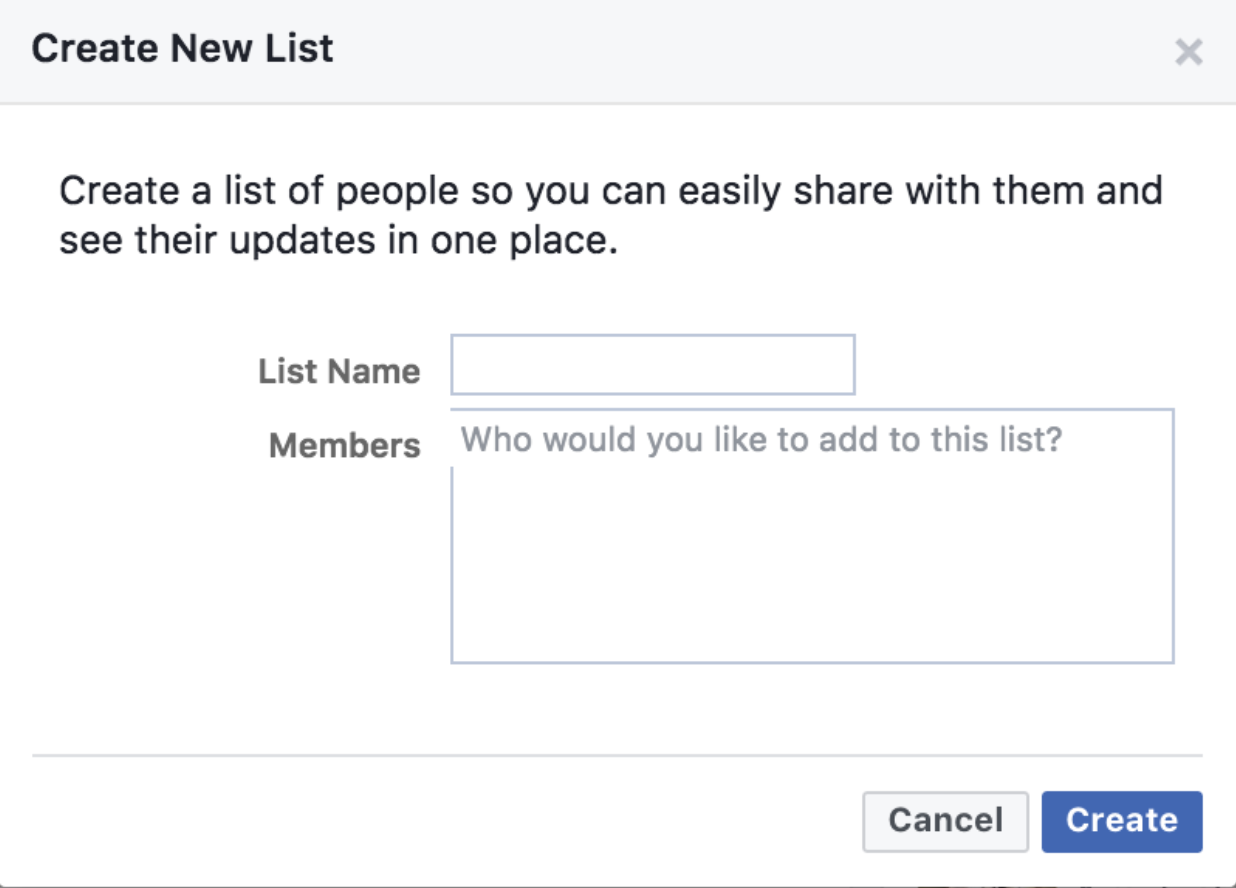
Click “Create List”.
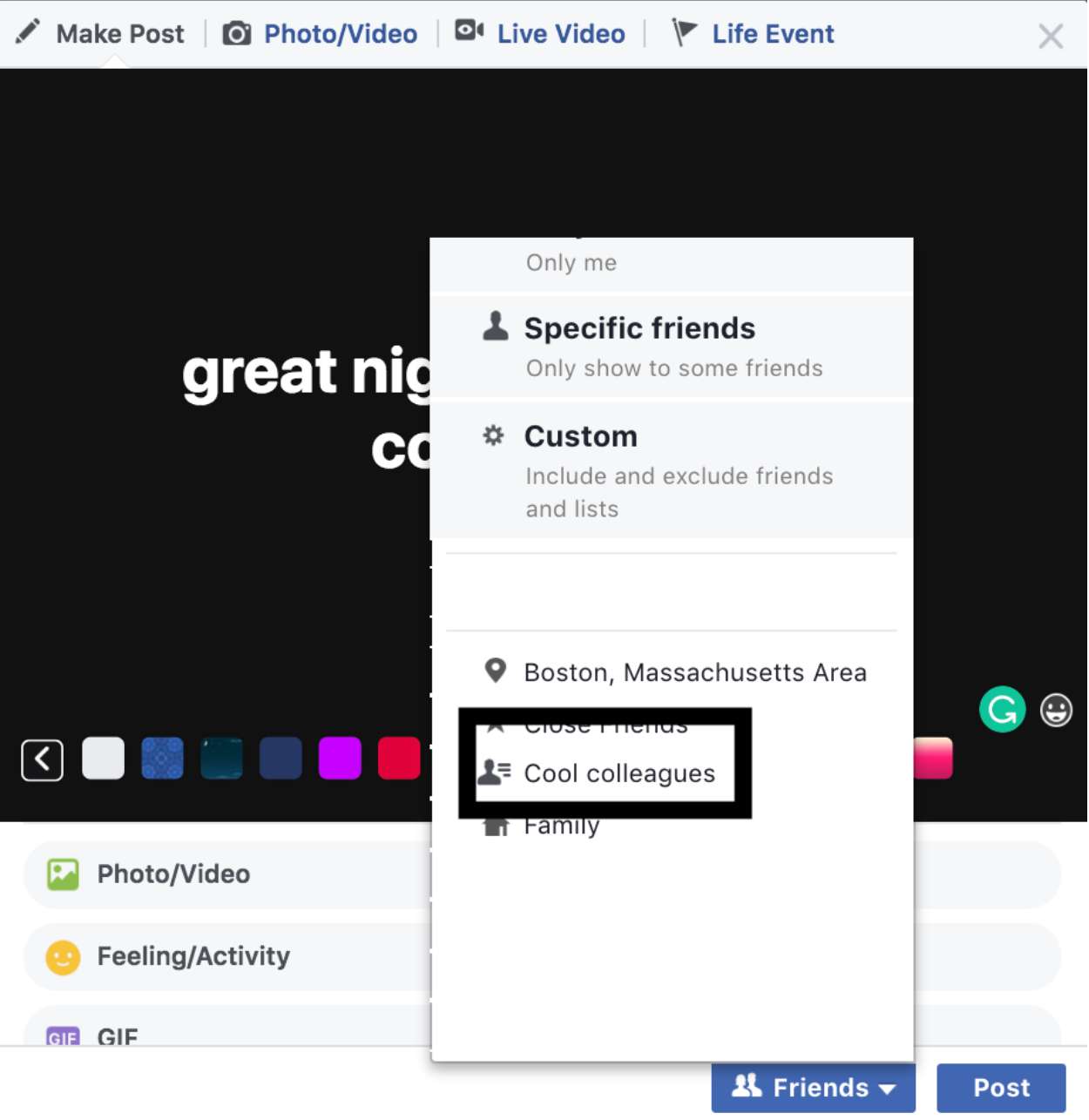
Give your list a name and start adding members. (In this scenario, I’ll name it “Cool Colleagues”.)
Click Create.
Post status/pictures and at the bottom, next to the post, click who you want to share this with.
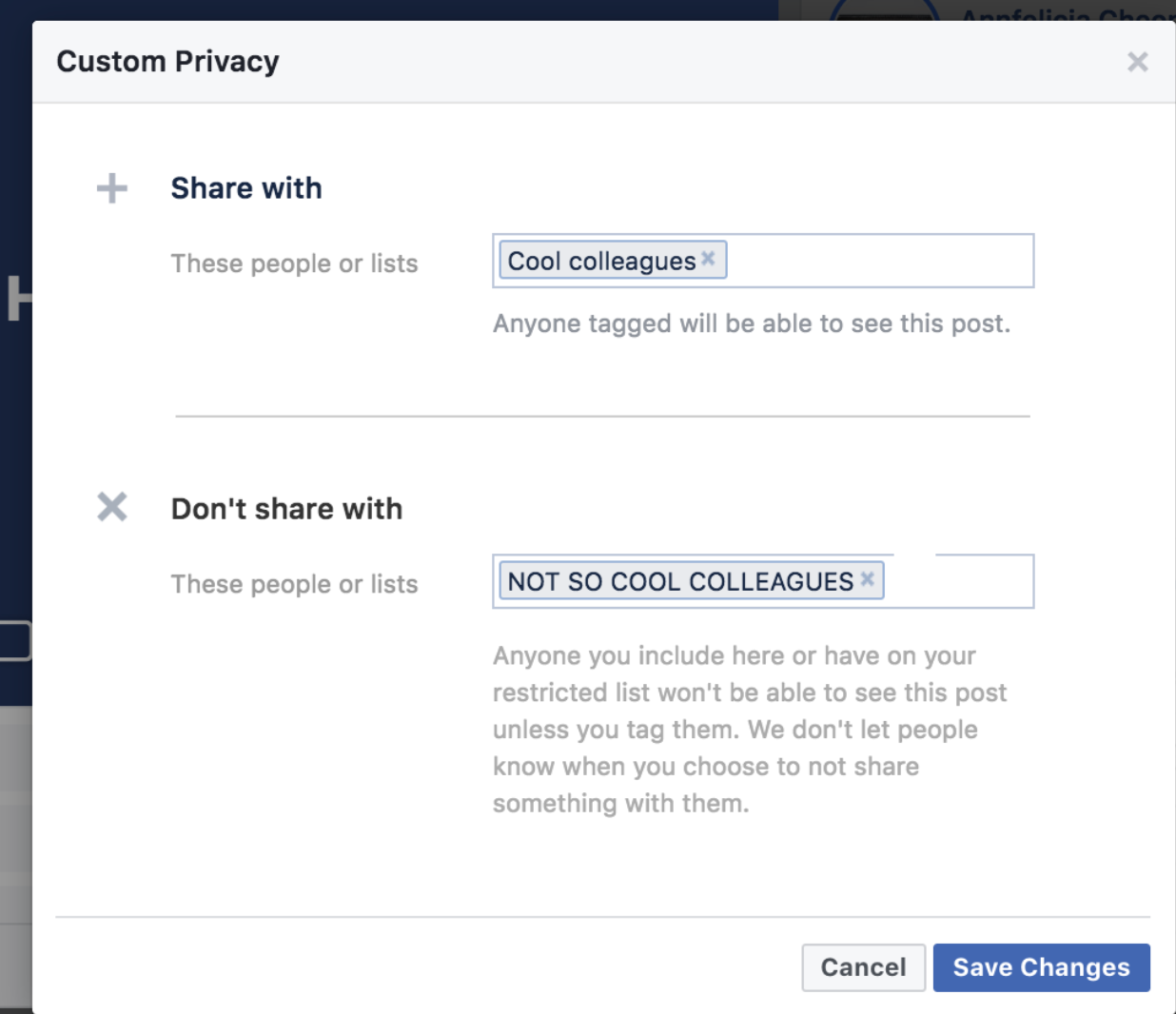
Scenario 3: You and your cool colleagues share an inside joke about your boss or annoying colleagues and you want to share it on Facebook. So you only want to share this status or post with certain few people and NOT with certain few people.
After typing your posts, click next to the “Post” button
Click “Custom”.
Type out the names/group you want to share with on “Share with”.
Do the same for the people you don’t want to share with on “Don’t share with”.
Want to do more with the privacy settings? Just follow these steps to get more information.
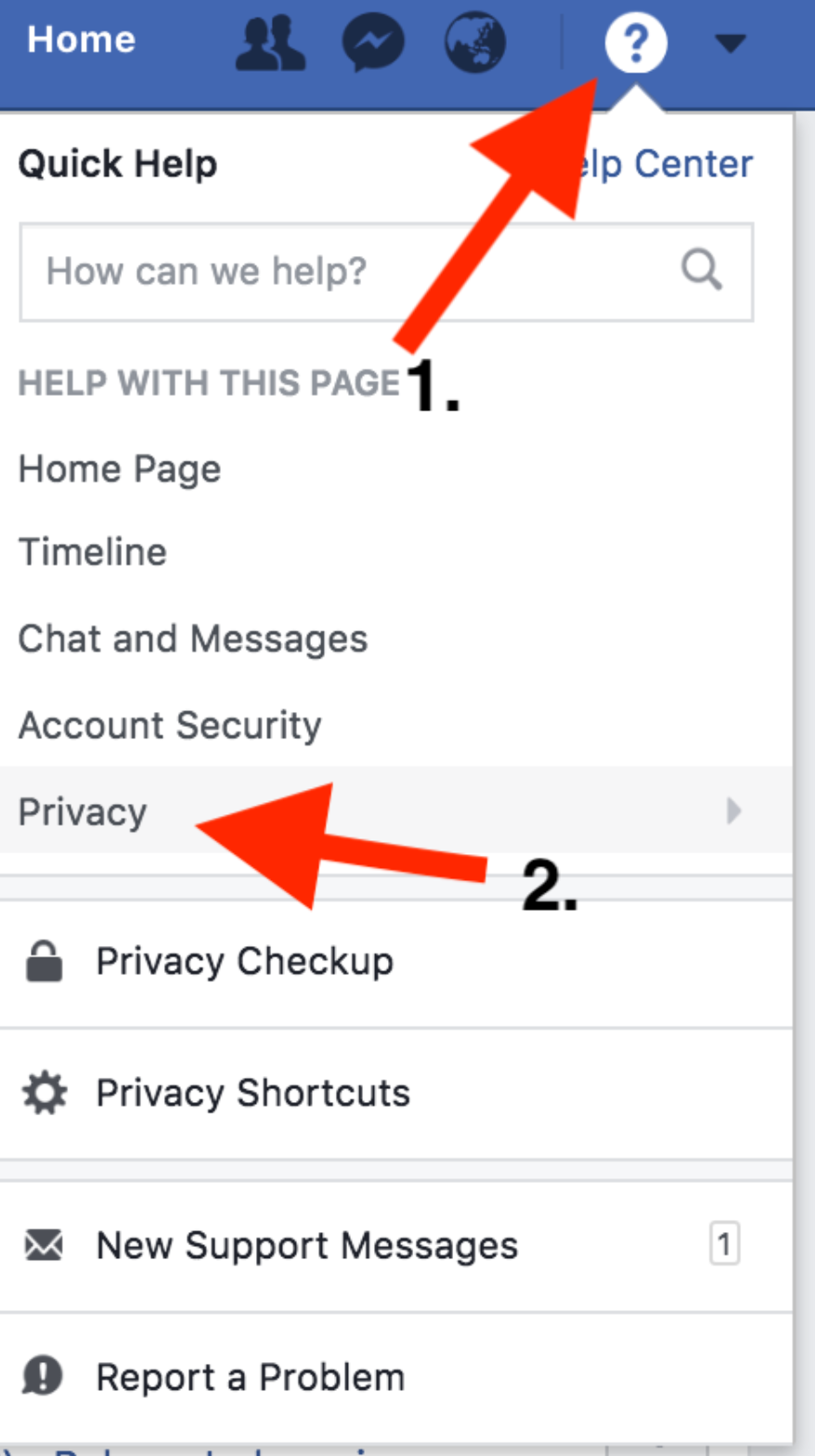
Simply click on the “Help Center” and scroll to “Privacy”.
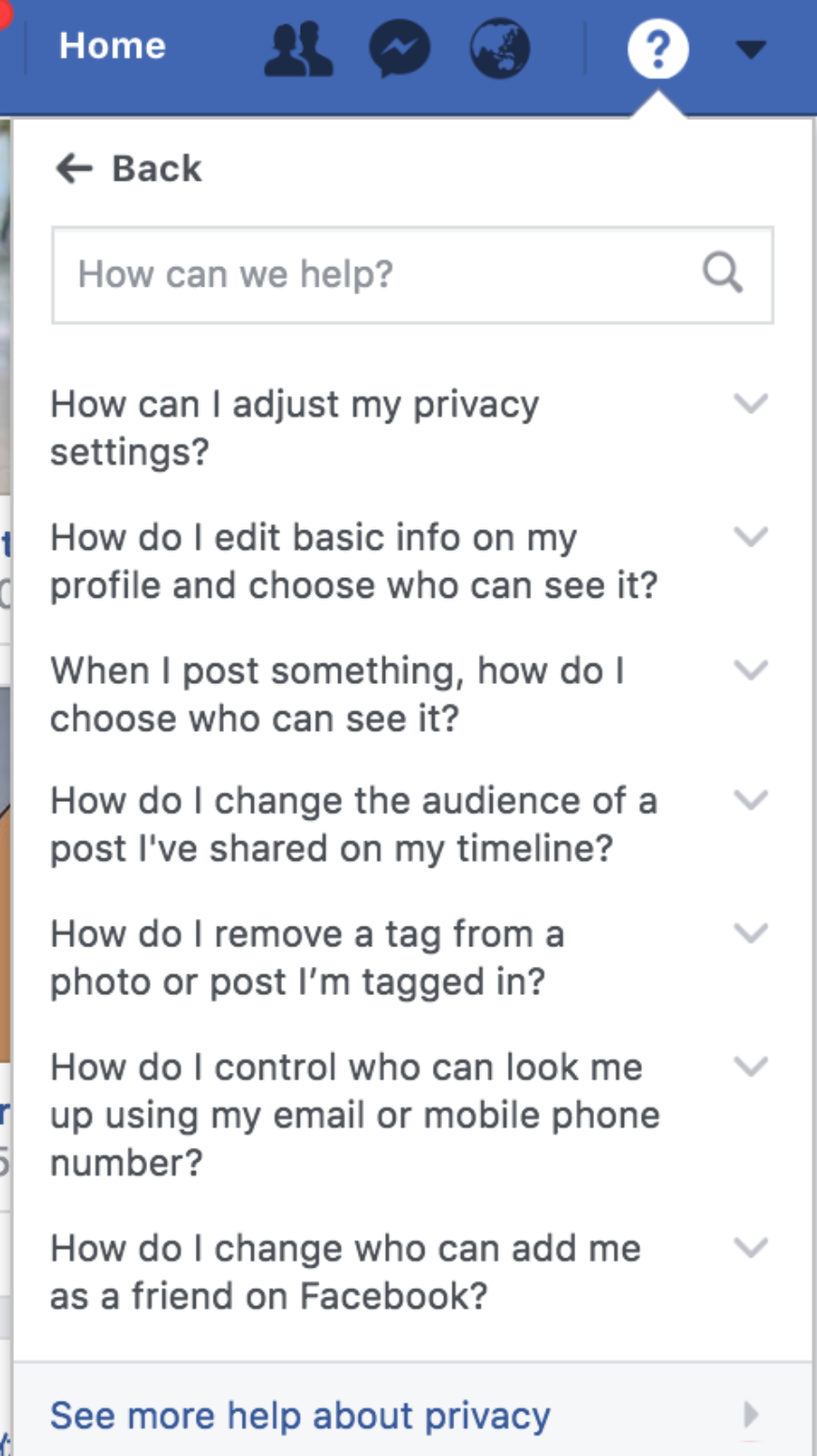
Here you’ll see all kinds of FAQs and you can also type your question on the bar to easily search for your query.
What about something else besides hiding your posts from co-workers? How about your personal data that Facebook has been collecting discreetly even though you no longer use that certain app?
It is super convenient to sign up for 3rd party apps outside of Facebook by simply clicking “Sign up using Facebook”. Let’s face it, we click on that button simply because of the convenience; you don’t have to remember another login credentials, you don’t have to go through the hassle of typing every personal information, and it’s faster.
What happens when you don’t use those apps anymore? Or even if you don’t log in to your Facebook account at all?
Your personal information and data are still being collected by Facebook. Information such as your IP address which means your location, the web browser you use, your name, your personal information and many more. Is this a form of privacy violation? How can you prevent that from happening?
Here’s how:
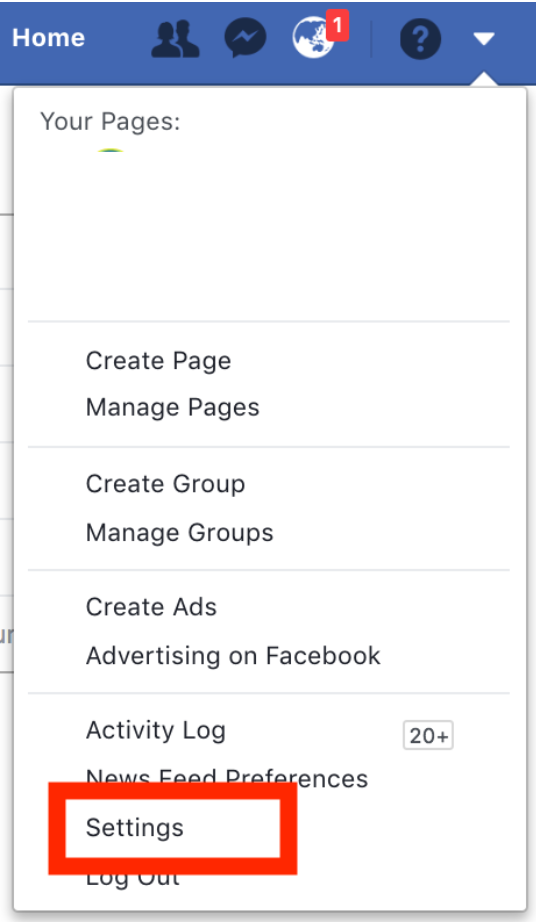
Go to your “Settings” page.
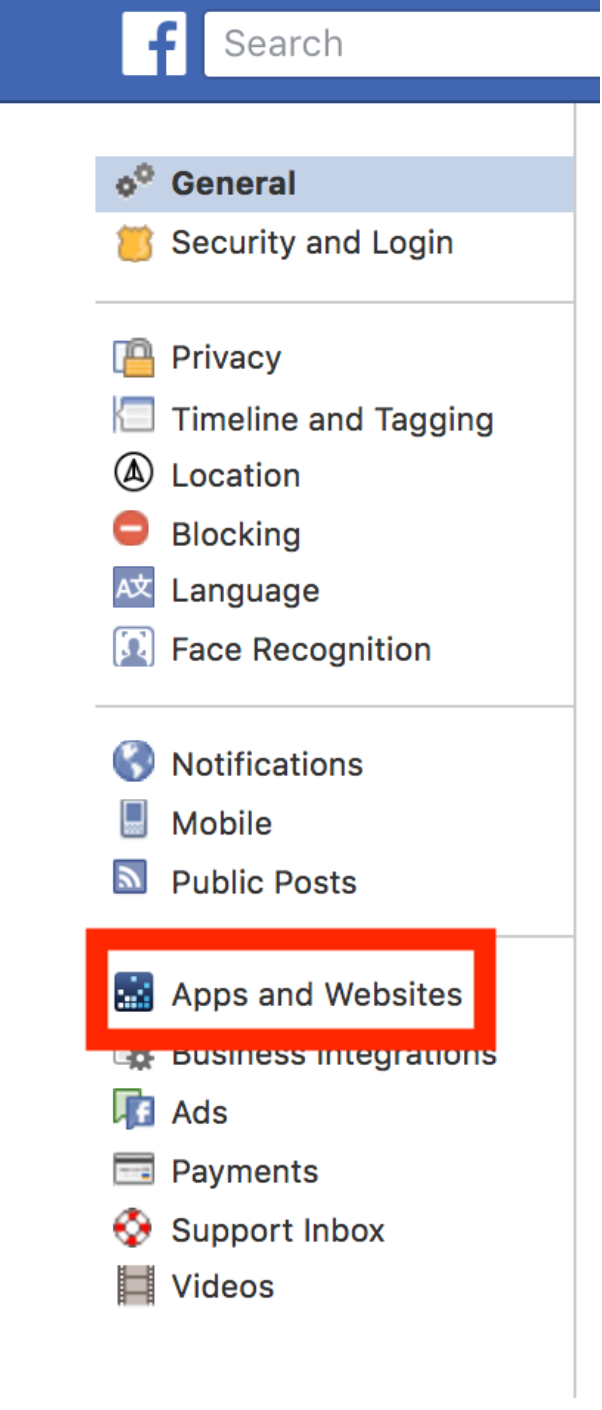
Click on “Apps and Websites”.
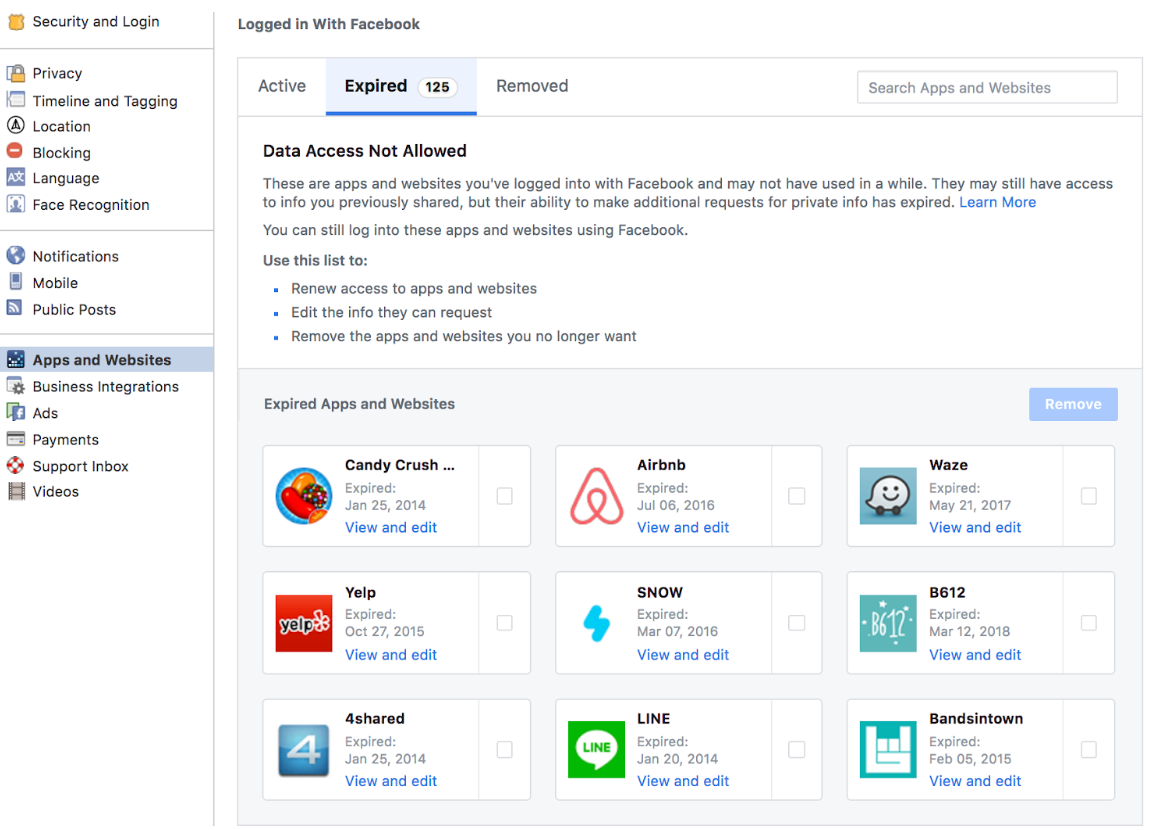
You’ll see the list of apps that you’ve had linked with your Facebook account- actively, expired or has been removed.
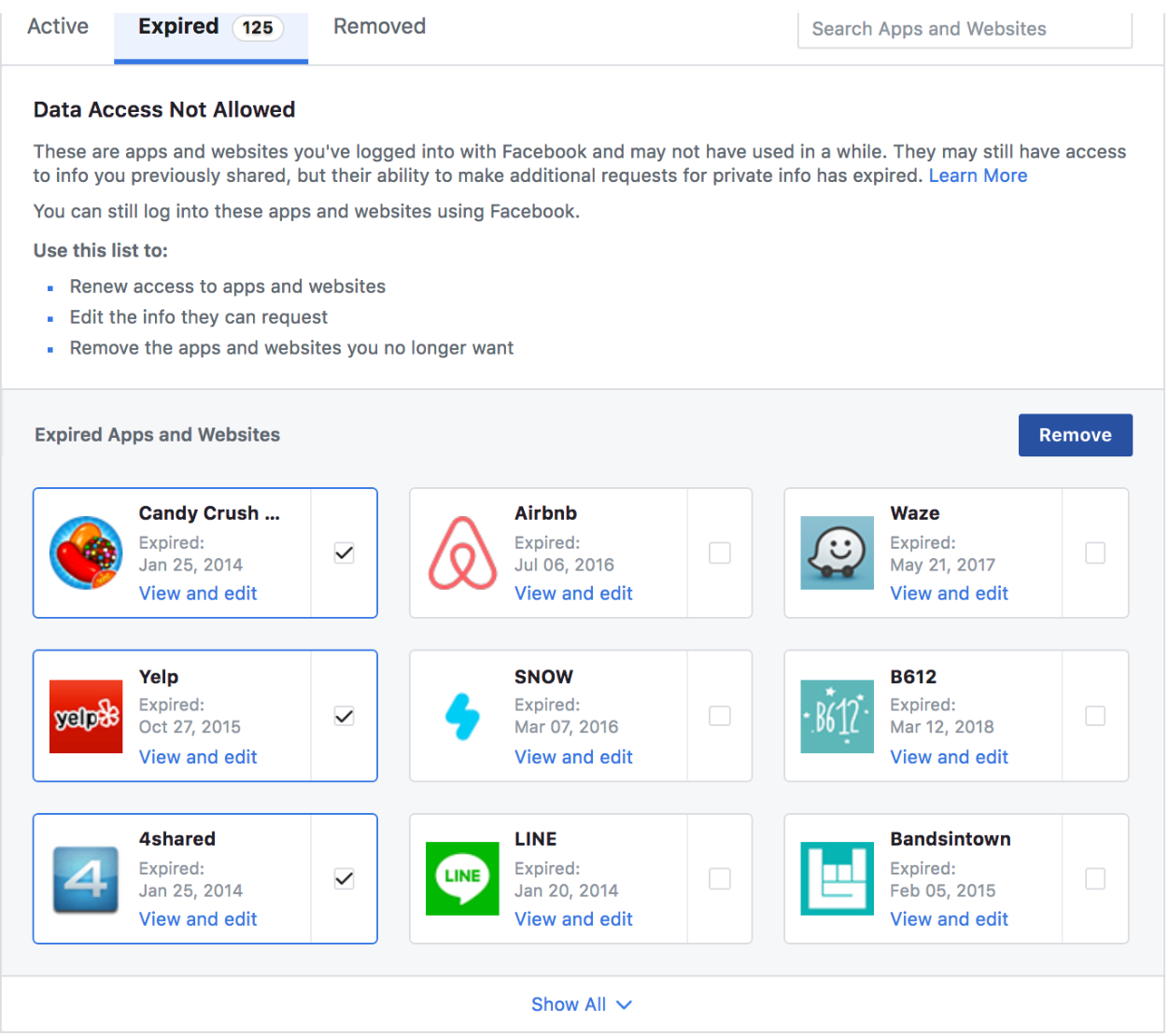
Select the apps you no longer want to share information with.
Click “Remove”.
You can do this cleanup from time to time when you have apps you no longer use and are linked to your Facebook account.
There are a lot more you can do with your privacy settings. Play around the privacy settings in your account and you’ll discover more than you can think of.
Artificial Intelligence or AI for short has seen a major resurgence back into the forefront of technology in recent years. AI in itself is not a new concept and as early as 1966, the late Joseph Weizenbaum, an MIT professor at the time, was able to write a program that could pass the Turing test, which meant that the program was intelligent enough to fool some people into thinking that it could have been a human.
So what has sparked this newfound interest in AI?
Advancements in computing hardware have made it possible for machine learning to become mainstream. Machine learning has in turn fueled the growth of technologies like facial recognition, natural language processing and video analytics which form the basis for game changing technologies like autonomous vehicles, Virtual Personal Assistants and chatbot technology.
Chatbots in particular have gained a significant level of interest with its wide reach in almost all service industries such as tourism and sales.
Virtual Reality
Virtual Reality has certainly come a long way since the initial Kickstarter campaign for the Oculus Rift in 2012. With immersive VR technology being readily available on platforms like YouTube and Facebook, what was once confined to a niche market has now made its way to mainstream audiences, giving brands new and innovative ways to engage their target audiences.
VR environments are especially suited for industries like tourism where the level of immersion can seal the deal for customers and to pay to experience the real deal. Such initiatives are already taking place in Wales where the Wildlife Trust of South and West Wales were commissioned to create “Dolphin Dive” and “Flight of the Kingfisher” VR experiences in order to promote tourism in the country.
Tour companies can also look to engage influencers to produce 360 degrees VR experiences of tour highlights like safari adventures or a skydiving experience.
Google Algorithm
In early 2017, Google Algorithm’s Fred update impacted many websites and caused a reduction in traffic for sites that prioritise monetisation over user experience. Other independent research also indicate that sites with poor quality backlinks were also affected.
This change affected backlinks to sites with poor domain authority, outdated or broken links, or downright “unnatural” links – so much so that some SEOs believe link quality to be the defining characteristic of the Fred update.
There are several steps that you can take to minimize the risk that your site will be hit by future algorithmic changes. If you’re worried about the potential impact of Google updates, in 2018, focus on quality of site, user experience, high quality backlinks, quality user-centric content update.
“2018, focus on quality of site, user experience, high quality backlinks, quality user-centric content update.”
Micro-Influencers
Move over Anna Cay and make way for [insert any influencer you want]!
When it comes to the influencers of the world, bigger doesn’t always mean better and marketing professionals are starting to notice. While top influencers have the advantage of reach, micro-influencers (with a following of a hundred thousand or less) can boast higher levels of engagement. Even if fewer people see their ads, they are more likely to take action.
What’s more, micro-influencers tend to place higher value on the opportunity to generate new content, form new partnerships and are less likely to demand large sponsorship payments. It takes a bit more effort to source for multiple micro-influencers but you will soon find that it is well worth the effort. [contact us to find out how we can help you get started with these micro-influencers]
Virtual Personal Assistants
Mobile, in the present day, has undoubtedly become the core of a digital marketing ecosystem, enabling the use of social media, online purchasing, community engagements and location based services. While the world is still reeling from the dizzying speed that mobile has dominated the space, a new wave of transformation is starting to take place.
Enter the AI or Virtual Personal Assistants.
The technology may now only be in the early stages of adoption but pretty soon, systems like Amazon Alexa or Google Echo will be ubiquitous in every modern home, creating yet another touchpoint for marketers to reach consumers.
Whilst monetization options a few at this moment, we expect 2018 to be a year where cross-device sales and marketing becomes mainstream. When the day comes that a voice command in your living room is able to activate your mobile phone to order a take out, just remember that you heard it from us first!



 WhatsApp us